


Analytica House
Mar 27, 2023The 5 Most Common Reporting Errors in GA4

Released in beta in October 2020, GA4 became mandatory for all non-360 accounts as of July 2023. From that point on, accounts with GA4 integration must manage their entire reporting workflow through GA4.
Although GA4’s interface is more user-friendly than Universal Analytics, many reporting errors still occur. In this article, we cover the five most common GA4 reporting mistakes and how to fix them.
-
Missing Data
Sometimes you’ll see no data at all in GA4. This usually happens because the tracking code is installed incorrectly or blocked in the user’s browser. To fix it:
- In GA4, go to
Property → Data Streams → Weband copy the Measurement ID of your stream. - Install that ID either by hard-coding it into your page source or by adding a “GA4 Configuration” tag in GTM.
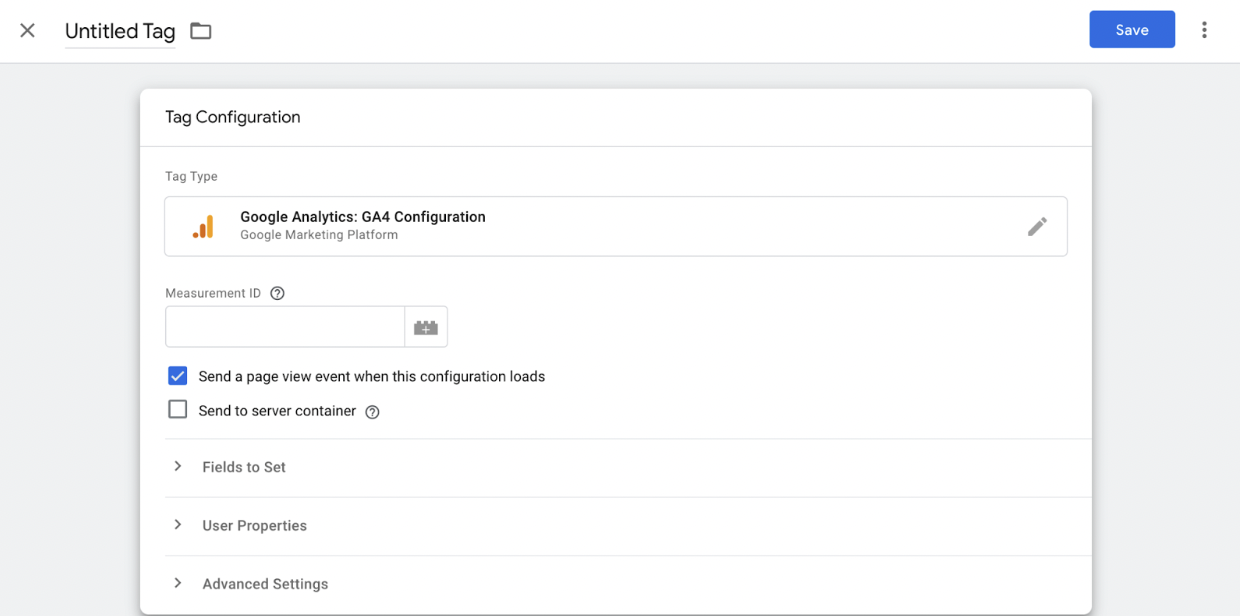
- In GA4, go to
-
Data Duplication
Often this is caused by having the GA4 snippet both hard-coded and deployed via GTM. Use only one method—either install directly in your HTML or via GTM, but not both.
-
Misinterpreting Data – UA vs. GA4 Comparison
Universal Analytics (UA) and GA4 use different data models (UA: session/last-click; GA4: event/last-engagement) and serve different use cases. Comparing their reports side by side leads to confusion. Instead:
- Learn what each metric and dimension means in its own context.
- Choose the tool that best fits your needs rather than forcing a direct comparison.
For more details, see: Differences Between UA and GA4
Attribution Model Differences
- Last Non-Direct Click: Ignores direct traffic and credits the last non-direct source.
- Last Click: Includes all sources and credits the very last click.
-
Invalid Data Filters
Filters that are too strict or misconfigured can exclude valid data. Check your filters under
Admin → Data Settings → Data Filtersand ensure you only filter out truly unwanted traffic. -
Overwhelmed Analysis Interface
When you have thousands of events and parameters, GA4’s UI can become unwieldy. For large datasets, enable the GA4–BigQuery link and perform your complex queries in BigQuery for more reliable, scalable analysis.
More resources

What Is GEO Consulting? The Era of Generative Engine Optimization
Digital marketing is experiencing its most profound shift since the dawn of the commercial internet....

What Is SEO Consulting? What Does SEO Consulting Entail?
In today’s digital environment, visibility is the primary measure of success. As search engine algor...

What is Cohort Analysis? Understanding User Behaviors through Segmentation
In the world of digital marketing and product management, making data-driven decisions is no longer...