

Marketing tips, news and more
Explore expert-backed articles on SEO, data, AI, and performance marketing. From strategic trends to hands-on tips, our blog delivers everything you need to grow smarter.

What Are Performance Marketing Metrics? The 15 Most Commonly Used Metrics
Marketing metrics play a crucial role in interpreting the campaigns we launch and the ads we create. It’s essential to derive insights from the data we have and take action accordingly. Accurately analyzing a campaign’s metrics and taking the most effective actions during this process is critical.Misinterpreting performance success—whether through missing or incorrect analysis—can lead to mistakes in judging whether our campaign is performing well, causing both short- and long-term missteps. In this article, we’ll share tips on how to correctly interpret the most frequently tracked and most important metrics in performance marketing.What Does “Metric” Mean in Performance Marketing?Marketing teams use measurable figures called marketing metrics to show the success of campaigns and projects across all channels. Examples include Conversion, CTR, and ROAS.What Is a Conversion?When creating a digital marketing campaign, every brand has one or more goals that motivate users to take action. All marketing efforts are ultimately aimed at achieving these goals.A Conversion is the metric that counts how many times a specified goal is achieved within a website, page, or mobile app. For an e-commerce company, this metric might be the number of sales; for a consulting firm, the number of leads (form submissions). A high conversion rate indicates your ad campaign is successful and your landing page content is compelling.If your conversion count is low, you might improve it by changing site content, creating new funnels to simplify the conversion process, or updating offers to provide a more effective experience for users.What Is Conversion Rate?Conversion Rate measures how often conversions occur as a result of your ads. It shows the percentage of ad interactions that turn into your defined conversion goal. By looking at conversion rate, you can optimize landing pages, calls to action, content, and design, and gauge how compelling your ads are to your target audience. Conversion Rate is calculated by dividing the number of conversions by the total number of sessions. For example, if an ad generates 300 sessions and 10 conversions, the conversion rate is 3%.What Is Conversion Value?Conversion Value assigns a numerical value to specific conversions in your campaigns, helping you measure how valuable those conversions are to your business. By assigning different values to different conversions, you can make your campaign’s value measurement more meaningful. You can compute Conversion Value using the formula: Sessions × CR × Average Order Value.For example, if a shoe retailer has 10,000 sessions, a 1% conversion rate, and an average order value of 1,000 TL, the Conversion Value is 100,000 TL.What Is CPC?CPC (Cost Per Click) simply shows how much you pay for each click. Because you pay per click, irrelevant users clicking on your ads increase your unnecessary costs and raise your total spend.CPC is one of the key metrics for evaluating campaign performance. To lower CPC, you can optimize ad relevance, switch bidding strategies, and target the right keywords through analysis.What Is a Session?In digital analytics, a session measures a user’s interactions on a website within a given time frame. A session begins when the site loads and ends when the user closes the site or is inactive for 30 minutes. It encompasses pageviews, events, and other actions the user takes.To increase session duration, enhance site experience—improve design, readability, navigation, and content to keep users engaged and complete your desired conversions.What Is CPS (Cost Per Session)?CPS measures the cost of each session driven by your ads. Since sessions reflect active user engagement on your platform, Cost Per Session shows how much each session costs based on your ad spend.What Is ROAS?ROAS (Return on Ad Spend) measures your ad performance in terms of cost versus revenue. It represents the profit you earn for every unit of currency spent on ads. Since brands aim to get a strong return on investment, tracking ROAS provides powerful insights into campaign success.For instance, even if an ad brings in many high-quality users and revenue, it’s not a cost-effective spend if the cost exceeds the revenue. ROAS tracking helps you avoid such scenarios.What Is CTR (Click-Through Rate)?CTR measures the percentage of ad impressions that result in clicks. It indicates how relevant and compelling your ads are to your target audience. A high CTR is critical in PPC, as it affects Quality Score and indirectly the cost per click. Google Ads and other platforms reward high-quality ads with lower costs.If a competitor pays the same CPC but has a lower Quality Score, you may pay less to achieve a higher ad position. You can boost CTR by including search terms in headlines and descriptions, adding URL paths, and targeting the right keywords.In display campaigns, where creative visuals matter most, CTR offers insight into the effectiveness of your creatives.What Is a Lead?In marketing, a lead typically refers to a form submission generated by your campaigns. Each lead represents a potential customer. However, a high lead count doesn’t always mean campaign success—lead quality matters most. That’s why defining your buyer persona and targeting accordingly is crucial.To convert leads into sales, provide personalized content, maintain close collaboration with your sales team, and guide users along the funnel.What Is CPL (Cost Per Lead)?CPL measures how much each lead costs you. It shows whether you’re allocating your budget effectively. By comparing CPL across channels, you can reallocate budget from high-CPL channels to those generating leads more efficiently.CPL = Total Ad Spend / Number of Leads.What Is Search Impression Share?Search Impression Share is the ratio of impressions you received to the total impressions you were eligible to receive. Eligibility depends on factors like audience targeting, approved ads, bids, and Quality Score. For example, a 50% impression share means you appeared in half of the available auctions.If your impression share is low, you’re missing potential customers. Increasing impression share relies on high Quality Scores, sufficient bids, and adequate budgets.What Is Top Impression Share?Top Impression Share measures how often your ad appears above organic search results. If you notice your click-through rates dropping, it may indicate you’ve lost a top position.What Is Absolute Top Impression Share?Absolute Top Impression Share is the percentage of your total impressions that appear in the very top ad position. It’s calculated as impressions in the top position divided by the estimated eligible impressions for that position.What Is Bounce Rate?Bounce Rate is the percentage of users who leave your site after viewing only one page without taking any action. Tracking bounce rate helps you assess site experience. A high bounce rate can signal issues such as irrelevant content, slow loading times, or poor mobile optimization.To lower bounce rate, define your audience accurately, optimize page load speed, and use clear, compelling CTAs.Bounce Rate = (Single-Page Sessions / Total Sessions) × 100.What Is Frequency?Frequency measures how often a user sees your ad. Multiple impressions can help undecided users purchase, but if they see the ad repeatedly without converting, you may need to broaden your audience or adjust spend.Very high frequency can annoy users and harm your brand. Expand your targeting or reduce budget if frequency is too high. Ideal frequency varies: it’s lower for new-user campaigns and higher for remarketing. Determine your target frequency by reviewing past campaigns to find where CPA was minimized.

test
HelloHelloHelloHelloHelloHelloHelloHelloHelloHelloHelloHelloHelloHelloHelloHelloHelloHelloHelloHelloHelloHelloHelloHelloHelloHelloHelloHelloHelloHelloHelloHelloHelloHelloHelloHelloHelloHelloHelloHelloHelloHello
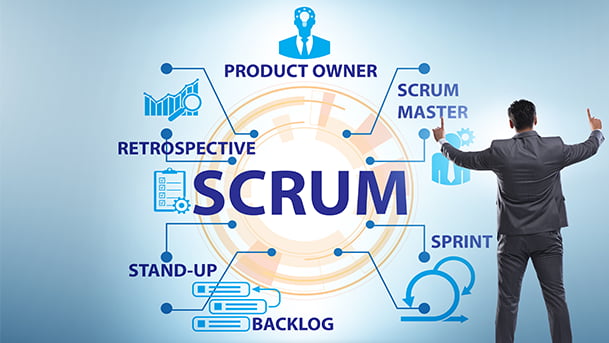
Agile Project Management and the Scrum Method
In order to understand why the scrum method, which is one of the Agile project management methods, is important, it is necessary first to analyze what the agile project method is, its history, and accordingly the need for one of the methods, the scrum method, and understand the requirements of the technique and where it is important.It would be best to evaluate the importance of Agile project management and scrum method according to the place and time of application. When these project-based methods are applied at the right time and in the right place, they will work in gold and will pave the way for people and institutions to stay up-to-date in the developing world. This will increase the quality of the projects and seriously improve the people and institutions working on those projects.What is Agile Project Management?Agile project management is a project management approach that is implemented by dividing the entire lifecycle into small parts, based on iteration from the first step to the last step of the project lifecycle, and re-planning and controlling at each of these steps.These interconnected and iterative life cycles are based on increasing speed and efficiency in projects. Agile project management, which is frequently used especially in software development projects, does not follow a linear path unlike historical project management, and gives you the authority to make changes and edits at each project step. The basis of this method, which prevents mistakes and loss of time, lies in mutual trust, desire for cooperation, advanced authorization skills, and the ability to be flexible and stay flexible.Agile project management, in which the steps of planning, implementation, control, feedback, review, and commissioning are applied respectively as in the image below, differs from classical project management applications with its system based on iteration, which has interconnected life cycles. The life cycle of the commissioned project does not end as it is commissioned, the life cycle is connected to the next project and follows the same steps as the old project.We will talk about how well this method works in the next parts of our blog. But at least, it is possible to say from the operation of this method that there is a continuous control mechanism in agile project management and the life cycles of projects are linked, that there are fewer mistakes, or that the results of the mistakes made can be easily reversed in the life cycle steps.What is The Scrum MethodSo what is the scrum methodology, which is one of the agile project management methods? Let's answer right away. With the frequent and rapid development of the world, it became difficult for especially large and bulky companies to keep up with the new order, customer expectations increased, and the scope and objectives of the projects expanded. As a result, project management became difficult and failures occurred in projects. Then several heroes appeared.The scrum methodology, developed by Ken Schwaber and Jeff Sutherland in the early 1990s, brought a new breath to project management whose efficiency started to be discussed. As can be noticed from the data obtained, the success rate in the projects has accelerated and increased after the development of agile project management and the scrum method.These philosophies are in the scrum methodology, which is built on 3 basic philosophies: Transparency: For the smooth progress of projects, mistakes, and truths are clearly seen by everyone Monitoring: Checking regularly Adaptation: Ensure changes made are compatible If we want to take a short trip to the times when the Scrum methodology was first applied, we see that this methodology is mostly used to optimize the project-based work of teams in information systems. When compared to the waterfall method, which is the most classical project management technique used in the world, it can be seen how important the scrum methodology is. The biggest reason for this difference is that project definitions in the world have become more complex. Because the scrum methodology is more meaningful for projects with complex and uncertain requirements by its nature. In addition, the benefits of the scrum methodology in increasing the profitability of companies due to market conditions and the flexibility in keeping up with changing technologies make the scrum method superior to the waterfall method.As can be seen in the chart above, there are serious differences between the success rates of large, medium, and small-scale projects in waterfall and agile scrum systems between 2013 and 2017. Especially as the project size grows and the project becomes more complex, the success experienced in the scrum methodology is an indicator of how successfully the scrum methodology works in complex structures.How Agile Project Management Scrum Methodology Works?For the Agile project management scrum methodology to be successful, the customer, who is defined as the product owner, must have a good command of the subject and exhibit a collaborative attitude with the development team, that is, the teams that will apply the scrum methodology.Without a hierarchical structure among team members, environments should be created where everyone's ideas and thoughts can be expressed on equal terms and weighed on equal scales. In all roles, people should be responsible and want to make a difference with their ideas. Meetings should be held regularly. Ideas and the project's point should be communicated to the customers quickly and continuously. In this way, it should be facilitated to serve the real purpose of the project by receiving feedback at every step of the project. The steps are generally defined as follows. But of course, here too, there has been constant change and development due to the nature of the scrum methodology itself.In the Scrum methodology, the product owner is responsible for the management of the product scope - the first part called the product backlog - due to his duty. A product owner is a person, not a group. The items in the product backlog, which is the first stage of the Scrum methodology, should be clearly expressed by the product owner for the healthy progress of the project.In the Scrum methodology, the priority order for these items should be determined and the necessary briefs should be sent to the teams according to this priority order. The people in the development team, who will work in the next stages, act with the direction of the product owner. For this reason, the responsibility is on the product owner no matter what. Because at the end of the day, the product owner is positioned as the person who approves the outputs of the project in the scrum methodology. The task in the sprint backlog, which is one of the stages of the Scrum methodology, is to determine who is responsible for the task and how much effort the team/teams should spend to complete that task.In Agile scrum methodology, your contribution to the other person is expected to be at the maximum, while your productivity should increase gradually. It can be said that Agile is more flexible than scrum, which is a sub-branch of the project management system. Leadership teams are supported to achieve success.The Scrum method, on the other hand, seeks to get maximum efficiency and success from all teams by mobilizing all cross-functional teams. Of course, this system must be operated successfully and in accordance with its rules. Otherwise, the system will crash and the collapse of this system may result in chaos for the companies.For this reason, the duties of the people who apply the scrum method are also to guide companies that do not understand this system correctly. Because, as we have seen above, the projects that you can develop by understanding the scrum method, its functions and how it works will be many times better than the ones you can develop with the old basic project management systems. In addition, since it is a time-based working method, the time of the employees will be planned in the most effective and correct way, and both customer and employee happiness will increase.As a result, scrum methodology is the art of creating error-free results by dividing the project into parts by considering the scope of the project, with the project teams where the customer needs vary or are likely to show, and where the teams can organize themselves in terms of competence. The best part of this method is not dealing with the past, but planning and doing what needs to be done in the current conditions and changing world dynamics as a team. After all, who would want to use or buy a 1990 phone when the latest phone is available?
What is Google Ads Editor? Google Ads Editor User Guide
Google Ads Editor is an offline editor for your Google Ads accounts. It lets you perform almost all the same tasks you can do in the Google Ads interface, but offline. It’s designed as a desktop application for managing campaigns and making bulk changes.With Google Ads Editor, you can make changes in bulk without the delays of the online interface. Because it works offline, multiple account managers can make edits simultaneously.Why Do You Need Google Ads Editor?Large Google Ads accounts can have hundreds of campaigns, thousands of ad groups, and ads. Making large changes in the online interface could take hours or days. With Google Ads Editor, you can do it all in bulk and save significant operational time.Since Google Ads Editor works offline, there’s no waiting for the interface to load. You can make bulk edits, instantly spot errors, fix them, and then publish your changes.For example, imagine you’re running a one-week sale and want every ad to say “50% Off All Shoes.” In the online interface, that might take a day in a large account. In Google Ads Editor, you can do it in five minutes—and spend the rest of your time optimizing strategy.When Was Google Ads Editor Launched?Until 2006, Google Ads (then AdWords) could only be managed through the online interface. Advertisers complained about slow performance when making large changes.In response, Google launched Ads Editor in 2006. It was an immediate success.What Can Google Ads Editor Do?Google Ads Editor lets you do almost everything you can in the online panel: campaign budgets, bidding strategies, ad copy, keywords, sitelink extensions, and more.You simply download your account structure into the Editor, make bulk updates offline, and then upload your changes when ready.Warnings Before You StartBefore we dive in, a few cautions: Bulk editing makes it easy to introduce large mistakes. Always sync your account before you begin. If multiple users edit the same account simultaneously, you may accidentally duplicate campaigns or ads. Follow these tips to avoid issues when managing your account with Google Ads Editor.Installing Google Ads EditorTo install, go to https://ads.google.com/home/tools/ads-editor/, click “Download,” and follow the installer.After installing, sign in with your Google account to see your Manager and child accounts:Check the box next to the account you want, then click “Open” to load it.Before You BeginAlways synchronize first—this downloads your current campaigns into the Editor. Click “Get Recent Changes,” then choose “More Data” to pull down all campaigns. Once it turns from yellow to white, you’re synced.When it looks like this, you’re ready to edit:Using Google Ads EditorLayersThe left panel under “MANAGE” shows layers (Campaigns, Ad Groups, Ads, Keywords, etc.). Select a layer to view its items in the middle pane. For example, to edit ads, expand “Ads” and choose “Responsive Search Ads” or “Expanded Text Ads.” Use the search bar to find any element.FilteringClick the filter icon below to see filters relevant to the selected layer (e.g., match type, labels, bids for Keywords).Enable, Pause, DeleteSelect multiple items with Shift, then use the “Status” dropdown on the right to enable, pause, or remove them in bulk.Find and ReplaceClick the “Find and replace” button to batch-edit text—headlines, descriptions, URLs, etc. Enter the text to search for and its replacement, then click “Process.”Showing Your ChangesA triangle icon (Δ) marks edited items. Click it to sort and view only changed elements before posting.Viewing ErrorsBulk edits can introduce errors (too-long headlines, invalid characters, etc.). Click the error icon to view only items with issues and fix them before uploading.Campaign SettingsSelect “Campaigns” under MANAGE, click your campaign, and the right pane shows all settings—budget, bidding strategy, locations, etc.—which you can edit directly.Bulk Uploading AdsGo to “Ads” layer, click “Make multiple changes,” choose “Paste from clipboard,” and paste your sheet of headlines, descriptions, URLs, etc. Ensure columns match the Editor’s field names.Map your sheet columns to the Editor fields, then click “Process.” Resolve any errors, click “Keep” to accept.Then click “Post” to upload changes.Uploading KeywordsSimilarly, prepare a sheet with Campaign, Ad Group, Keyword, Max CPC, etc. under the “Keywords” layer, click “Make multiple changes,” paste, map columns, and process.Adding Sitelink ExtensionsSelect “Ad Extensions” → “Sitelinks,” then “Make multiple changes.” Include Campaign or Ad Group if needed, plus Link Text and descriptions. Paste your sheet and process.Reviewing Your EditsClick “Check changes” in the top right to preview all edits. Green means OK; red flags indicate issues to fix before posting.Posting ChangesFinally, click “Post” in the top right to push all your offline edits live to your Google Ads account.
How Google Ads Keyword Match Types Work with 10 Examples
Knowing how match types work—the cornerstone of Search Network campaigns, the most used campaign type in Google Ads—is crucial for getting effective results. The match type you choose when setting up your campaign determines how efficiently you’ll reach your audience. To speak directly to user intent and secure a spot on the search results page, you need to understand the match types thoroughly. By using different match types, you can minimize unwanted matches with irrelevant queries and achieve a higher conversion rate. There are three keyword match types: broad match, phrase match, and exact match.1 – Broad MatchBroad match is the most expansive match type, helping you reach the widest audience. Your ad may show whenever the user’s query contains any part of your keyword—before, after, or between words. While broad match can drive maximum reach, it also risks matching irrelevant searches, which can waste budget. Better alignment between ad relevance and user intent improves click-through rate (CTR) and lowers cost-per-click (CPC).If your goal is to drive maximum traffic to your page, you can use broad match. However, you must regularly review search terms and add negatives to exclude unwanted queries. Otherwise, your budget may be spent on users who aren’t likely to convert. Broad match makes sense if you don’t have a detailed keyword list; Google’s algorithm can help find the most relevant matches for you. Then, you can exclude irrelevant terms via your negative keyword list.2 – Phrase MatchPhrase match is ideal for targeting your keyword plus its close variations, with more control than broad match. Your ad will appear when a user’s query includes your keyword phrase in the exact order you specify, though extra words can come before or after. To set up phrase match, enclose your keyword in quotation marks: "keyword phrase". Phrase match offers less volume than broad match but delivers higher-quality traffic, improving conversion rates and budget efficiency.3 – Exact MatchExact match is the most restrictive match type, letting you reach a very specific audience with precise search intent. Your ad displays only when a user’s query exactly matches your keyword or close variants. This yields a high CTR and strong conversion rate, though it may raise CPC due to limited reach. To use exact match, wrap your keyword in square brackets: [keyword].Negative Keyword ListsNegative keyword lists help you exclude multiple unwanted terms at once, rather than adding them one by one to individual campaigns. After choosing your match types, compile a list of irrelevant terms and apply it across campaigns. This saves effort and prevents budget waste on non-converting searches.For example, if you sell custom-designed T-shirts and use phrase match "custom designed t-shirt", you might see unrelated queries about DIY designs or tutorials. Regularly review your search terms and add negative terms to keep your campaign focused. Likewise, if you’re a store selling “purple potatoes,” use exact match [purple potatoes] to avoid recipe or planting queries. Better yet, add common irrelevant terms directly to your negative list when you launch the campaign.Example Setups1. Keyword: “custom designed t-shirt”2. Keyword: [purple potatoes]3. Keyword: “Germany to Turkey flight ticket”4. Keyword: [engagement ring]5. Keyword: “sunflower oil”6. Keyword: [red dress]7. Keyword: “faux leather blazer”8. Keyword: [women's shoes]9. Keyword: “Turkish coffee”10. Keyword: [bungalow house prices]
Google Ads Extension Types: Improve Your Ad Quality with Extensions
Google ad quality score is one of the issues that directly affect the performance of our ads and is of vital importance in the recycling of our campaigns. Some work needs to be done to increase our ad quality score. And in this article, we will talk about the types of Google Ads extensions that directly affect our ad quality score.What are Google Ads Extension Types?Google Ad extensions, as the name suggests, expand your ad. Ad extensions add additional information about your business to the main body of your text ad.In the image above, you can see examples of ad extensions in the red box: Google Ads extensions allow you to convey more information about your brand, including product highlights, related links, and pricing, to the user in a single placement.SEM ads are very competitive as each search results page only allows a limited number of ads to show, and your competing brands will do anything to gain an edge over the competition. So qualified clicks are valuable. Google offers a variety of ad extensions to advertisers to help increase ad rank and click-through rate. If your ad is eligible, extensions will give you more space on the search results page. As Google Ads puts it, “extensions give the user more reason to click on your ad”.As you can see in the example, the company that appears first to a user looking for a dealership offers many more options, while the second company has a one-line ad with very few details. Which one do you think is more appealing? Let's take a look at some important Google Ads extensions together. 1. Sitelink ExtensionsSitelink extensions add additional links below the main text ad in search. These links take users to other pages on your site that you want them to visit.In the example above, users can click on the links in the header and directly access categories such as Men's Collection and Jacket Collection. These types of links make users take fewer steps to get what they're looking for, reduce the bounce rate, and encourage conversions. Some research companies state that advertisers using the site links ad extension experienced an 8 percent increase in click-through rates.2. Callout ExtensionsCallout extensions are short 25-character texts that describe the most exciting and valuable features of your business, products or services. Therefore, if you want to announce the highlights of your products, the callout extension is for you.As you can see in the example, you can use the most exciting and valuable features of your products or services, such as Free and Easy Returns, Discover the New Season, and Free Shipping in your ads by adhering to the 25-character limit.3. Call ExtensionsWith the call extension, you can put your phone number directly in the ad. So you tell customers you're just a phone call away. This can build trust with your brand and make you feel more approachable and accessible.If you're not available 24/7 to answer calls, there's no need to worry because call extensions allow you to set your availability plan. Your number will not appear in your ads when you are not available. With so much mobile usage today, call extensions work best on mobile devices, where users can click the number and immediately call you directly from the search engine page. Especially if you run a physical store, call extensions are one of the most effective ways for users to contact you directly and set up an appointment with your store.4. Structured SnippetsStructured snippet extensions are used to highlight your products, services, and popular features that users can search for.This way you can list several different options that visitors will have if they click on your website. Users will know who you are and the service you offer before they even visit your website. In this way, users will have more information about you before they enter your site, click on your ad and reduce your budget, and you will avoid users who are less likely to convert.5. Lead Form ExtensionsGoogle allows you to add lead form extensions to your ads to collect important information. As a business owner, you can use lead form extensions to gather information to gauge user interest, gather feedback, or answer customer questions.You can use lead forms in your search, video and display campaigns. Google stores collected leads for up to 30 days and allows you to download them as CSV files or export them directly to your CRM with CRM integration where you keep your own data. You can do this integration with your custom software service such as Webhook or with intermediary software such as Mailchimp.You can use these forms to better understand how customers interact with your business. You can also use this information to create marketing funnels and retarget this audience in your ads. Google allows you to get the following data: Name Email Phone number City Postal code State / Province Country Company name Business Email Business Phone Number 6. Location ExtensionsIncluding your address in advertising campaigns is a great way to demonstrate the legitimacy and transparency of your business. People are more likely to trust your company if you are open and honest about who you are, where you operate, and how they can find you. In addition, if you have a physical store next to your digital business, it is one of the effective methods to direct users directly to your stores.People prefer businesses that look real, which means that being real will make them more likely to buy from you. Here are some rules to be sure of when using location extensions: Keep your contact information and addresses up to date. Use bid modifiers for users close to your business location. If you place competitive bids for users who are already in the region, you increase the likelihood of your location extension being seen. Be sure to monitor how your conversions are performing before and after adding a location extension. Adding this plugin can lead users to your physical stores, resulting in lower sales in digital channels.7. Affiliate Location ExtensionsWith the affiliate location extension, Google shows the closest location where your product is sold, via address or map. You can use the affiliate location extension to point your product to other locations authorized to sell.The biggest advantage here is that you can offer options to your customers. Because research shows that the majority of consumers who make local calls on their mobile phones visit a physical store. Therefore, providing up-to-date location information to customers searching for your products is one of the effective ways to increase the total sales of your products.8. Price ExtensionsWhen you add product prices to the ad extension and users click on the price, they go directly to the product page on your site. If you are also transparent about your prices, your product and service will be more likely to attract customers.If you inform users about pricing in advance, you can lower your bounce rate and get higher-quality clicks. Also, you don't necessarily have to write a single price on your price extensions. You can use more general expressions like "prices from... or average" to your extensions.9. App ExtensionsResearch shows that 85% of mobile users prefer apps over mobile sites. If your business has an app, you can take advantage of the Google ads app extension to encourage users to download the app.If your business has a mobile app, don't forget to define the app download as a conversion, and when examining the campaign success metrics, analyze the breakdown of conversions and examine how many app downloads came on a campaign basis, and make sure to separate them from your sales conversions.10. Promotion ExtensionsThe promotional ad extension allows you to highlight price-based data by product or brand. With the promotion extension, you can show the price, discount percentage, sales quotes, and other data to your users to grab the customer's attention.With the promotion extension, your ad can stand out among other advertisers because you create more eye-catching ads by highlighting your discounts, especially during discount campaigns.11. Image ExtensionsImage extensions, which were initially only available to select advertisers, are now available to all advertisers worldwide as of May 2021. Image extensions appear as a small image next to your text ad, as you can see below. Image extensions greatly help you complement and improve performance of your existing text ads.You can upload up to 20 images related to your keywords to best showcase the image extension. At the same time, your images must comply with Google's creative rules. You can find these rules here.When a user clicks on the image extension, they act as if they clicked on the main banner of the ad and are taken to the landing page. That's why it's important to align your image extensions with your campaign structure. When a user clicks on your image extension, it's important that they find that image, product, or service on the landing page you submitted. If they cannot find that image, product, or service, you will have a bad experience for the user. As a result, your click-through rates will decrease.12. Dynamic Image ExtensionsDynamic image extensions are automatic extensions created by Google. Google pulls, extracts, and displays images directly from your landing page or your ad's final URL. Image extensions will take precedence over dynamic image extensions. However, we recommend that you use both.Dynamic image extensions will kick in if you forget to add a manual image to your ads, or if for some reason they're not approved or delivered. So make sure you have relevant images on your landing page that follow Google image guidelines.