

Marketing tips, news and more
Explore expert-backed articles on SEO, data, AI, and performance marketing. From strategic trends to hands-on tips, our blog delivers everything you need to grow smarter.
What is Product Snippet (Product Schema) and How to Create It?
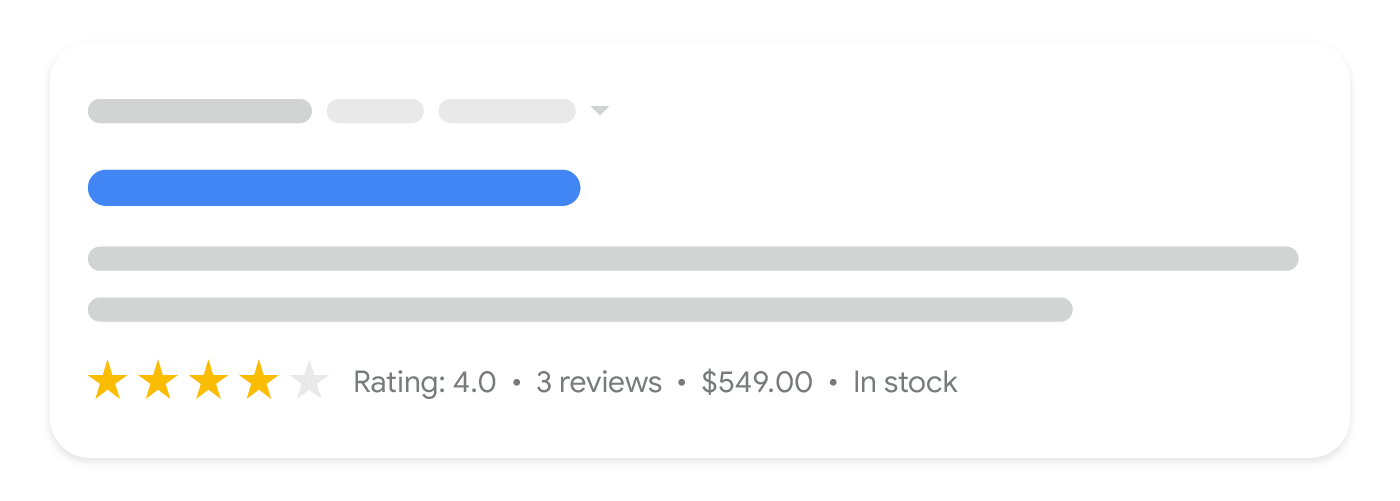
Product snippets are structured data formats that make e-commerce pages listed on search engines like Google appear more attractive and informative. These snippets can include information such as price, stock status, rating scores, and product images. When used correctly, they can increase the likelihood that users will choose your site among search results.These snippets are generally created using Schema.org structured data. With schema markup in JSON-LD, Microdata, or RDFa format added to HTML pages, search engines can better understand your content and index it accurately.Steps to Create a Product SnippetSelect Schema.org Structured Data: You need to create an appropriate product snippet using one of the formats: JSON-LD, Microdata, or RDFa. The most comprehensive source for this is schema.org. Support from Google Resources: Google, the most widely used search engine, publicly shares the metrics it approves regarding structured data. Click here for Google’s recommended Product Snippet procedure. Define Basic Information: For high-performing snippets, include key data such as product name, price, stock status, and ratings. Integrate into HTML Page: Optimize your page for search engines by embedding structured data into your HTML. The more dynamic the implementation, the easier your job becomes. Set it up so information is automatically pulled when products are added. Validate with Google Rich Results Test Tool: This tool directly identifies errors and issues in the structured data. Check the functionality of the schema markup using the Google Rich Results Test Tool.< Required HTML and Schema Markup for Product SnippetsOn product pages, the required information that Google wants to retrieve includes “Product Name” and at least one of the following: “review”, “aggregateRating”, or “offers”.Here is an example of a product snippet in JSON-LD format that you can add to your HTML page:script type="application/ld+json"> { "@context": "https://schema.org/", "@type": "Product", "name": "Samsung Galaxy S24", "image": "https://example.com/images/samsung-galaxy-s24.jpg", "description": "High-performance next-generation smartphone.", "brand": { "@type": "Brand", "name": "Samsung" }, "aggregateRating": { "@type": "AggregateRating", "ratingValue": "4.7", "reviewCount": "1500" }, "offers": { "@type": "Offer", "priceCurrency": "TRY", "price": "19999", "availability": "https://schema.org/InStock" } } This code provides search engines like Google with basic product information to generate rich snippet appearances in search results. For Google’s recommended Product Snippet procedure, click here.Where Should You Place Product Snippets?Product Snippets (Product Schema Markup) are usually created in JSON-LD format and added to the website. This is also the recommended method in Google’s documentation. Google’s guideline for placing a product snippet is as follows: JSON LD* (Recommended)JavaScript representation placed in the script tag in the head or body of the HTML page. The markup is not interspersed with visible text. This makes it easier to express nested data items such as the PostalAddress value of a MusicVenue element. MicrodataLike RDFa, it uses HTML tag attributes to name the properties you want to mark as structured data. It is generally used in the body but can also be in the head section. RDFaAn HTML5 extension supporting linked data by providing attributes for HTML elements corresponding to content visible to the user. RDFa is commonly used in both the head and body sections of the HTML page. In summary, you can place your product snippets or structured data in the head or body sections.*Expert Advice: Since HTML is read from top to bottom, placing it in the head section is more readable and robust.How to Check Product Snippets?There are several ways to check a product snippet or structured data in general. We’ll detail these methods below. Google Rich Results Test Tool Dev Tools Inspect Area Source Code Google Rich Results Test ToolThe Google Rich Results Test Tool lets you test whether a page’s structured data qualifies for rich results in Google Search. This tool allows you to see whether specific data types like product data are correctly processed and helps identify errors.You can start the analysis by pasting the URL of the page you want to test or by directly pasting the HTML code into the tool. It lists the structured data types found and explicitly indicates warnings or errors. It also provides a preview of how correctly defined data will appear in Google search results.Steps to test a Product snippet using Google Rich Results: Go to Google Rich Results Test Tool: Visit https://search.google.com/test/rich-results Paste the product page URL you want to check: Or alternatively paste the HTML code directly. Click the "Run Test" button: Google will start analyzing the structured data. Review the test results: Structured data types found on the page (e.g., “Product”) will be listed. Check for errors and warnings: Missing, incorrect, or recommended fields will be clearly displayed. For example, it will warn you if "price" is missing. View the product snippet preview: If the structured data is correct, a sample preview will be shown. Make necessary corrections and retest: After fixing the errors, rerun the test to ensure accuracy. Dev Tools Inspect AreaBrowser developer tools (Dev Tools) are useful to directly see how structured data is integrated into the page. Open the page and right-click, then select “Inspect” to access the HTML structure.In this area, you can directly view structured data in JSON-LD format defined with the script type="application/ld+json" tags. You can check whether necessary fields like product name, price, and stock status are correctly defined.To check Product Snippet via Dev Tools: Open the Devtools Inspect area on the page (F12) Press Control + F in the Elements tab to open the search bar. Search for "application/ld+json" Click the results and copy the code to a text editor to review the snippet. Checking via Source CodeYou can view the source code (Ctrl+U or right-click “View Page Source”) to directly see the placement of structured data in the HTML. This method lets you check both JSON-LD and other structured data formats like Microdata.In the source code, verify whether structured data is correctly defined with appropriate tags and content. It’s important for meeting search engine expectations and ensuring all required fields are complete and up to date.Required Metrics in Product SnippetsGoogle supports the use of structured data so that product pages can be shown as rich snippets in search results. However, to display these snippets correctly and effectively, certain metrics must be used. Below is a table listing the main metrics used in product snippets and their functions: Metric NameRequired?Description (Details) nameRequiredSpecifies the name of the product. Without this metric, a product snippet cannot be created. imageRequiredURL of the product image. Required for image display in the snippet. descriptionNot RequiredProvides a short description of the product. Optional but recommended. skuNot RequiredSpecifies the product’s stock code. Useful for inventory tracking and identification. brandNot RequiredIndicates the brand the product belongs to. Recommended for known brands. offersRequiredContains information such as product price, stock status, and seller. Required for price display in snippets. offers.priceRequired (within offers)Specifies the product’s sale price. offers.priceCurrencyRequired (within offers)Indicates the currency of the price (e.g., TRY, USD). offers.availabilityNot RequiredSpecifies stock status (e.g., InStock, OutOfStock). aggregateRatingNot RequiredShows the average rating based on user reviews. Builds trust. reviewNot RequiredContains user reviews about the product. Important for social proof. gtin / mpnNot RequiredThe product’s global identifier. Especially important for Google Shopping. Product Snippet Applications in Different IndustriesThe use of product snippets in different industries is an important SEO element that directly affects how businesses reach their target audience. Since each industry has unique needs and user expectations, properly structured product snippets ensure better visibility in search engines.For example, while technical features and ratings are prominent in the electronics industry, size and color options come forward in the fashion sector. In the food industry, content details and expiration dates may be critical for users. Therefore, creating a product snippet strategy tailored to each sector improves user experience and increases organic traffic. Electronics: For phones, computers, and other tech products – price, rating, and stock info. Fashion: For clothing and shoes – size, image, color, and stock availability. Food: For grocery items – price, ingredients list, and expiration date. SEO Advantages of Product SnippetsProduct snippets are a type of structured data that enhance SEO performance by making search engine results more eye-catching. These snippets provide critical product information (price, stock status, ratings, etc.) directly in the search results, offering a major advantage for e-commerce sites.When applied correctly, snippets not only increase your site’s click-through rate (CTR) but also boost organic traffic and conversion rates. Product snippets are a crucial part of SEO strategies and a powerful way to stand out in a competitive e-commerce environment.Impact of Snippets on Click-Through Rate (CTR)Rich snippets attract user attention by appearing more visually prominent in organic search results. Pages displaying price, images, and rating information receive more clicks, increasing CTR. When users find key product details directly in search results, the likelihood of clicking on a product of interest increases. In competitive sectors, snippet use can make a noticeable difference in click-through rates.Additionally, the extra information provided by snippets improves relevance for search queries, increasing the time users spend on your page and reducing bounce rates – offering further SEO benefits.How Product Snippets Contribute to Organic TrafficWith better visibility and increased clicks, e-commerce sites can grow their organic traffic. Presenting product details directly improves user experience and can increase sales conversion rates. When users can access info like price, stock status, reviews, and descriptions from search results, they’re guided straight into the buying journey.Moreover, search engines tend to rank pages with high user engagement and click-through rates higher. This helps snippet-using pages attract more organic traffic and boost brand authority in the long run. Properly structured snippets, especially those optimized for Google’s Featured Snippet or other special result formats, can exponentially increase organic reach.
19 SEO Tips to Gain Visibility on Google AI Overview
In today’s digital world, artificial intelligence and Google AI systems play a crucial role in determining how visible content is in search results. To ensure your website appears on Google AI and other AI platforms, your SEO strategies must be correctly optimized. Whether AI systems can accurately understand, crawl, and index your content can directly impact your rankings. Therefore, it's essential to tailor your content not only for human users but also for AI systems. To appear in the Google AI Overview, it’s not just about applying basic SEO techniques; it also requires understanding how AI evaluates your content. In this article, we’ll share 19 effective SEO tips to help boost your visibility across Google AI platforms. With these tips, your content will be easier for AI to understand, faster to index, and more likely to rank higher. Below are key steps to lay the foundation for creating AI-friendly content: - Making your content AI-compatible: What needs to be done for AI systems to crawl and interpret your content efficiently.- Optimizing page structure: The importance of SEO and AI-friendly site design.- Practical tips for content optimization: How to optimize titles, meta descriptions, and body content for Google AI.AI shapes search results by directly crawling and analyzing your web content. Therefore, your content must be fully accessible and optimized to appear in Google AI Overview. We’ve organized SEO tips for Google AI Overview visibility under the following main headings: 1. Robots.txt and Bot Protection Settings 2. HTML Structure and Accessibility Tips 3. Creating Content in HTML 4. Using "Agent-Responsive Design" 5. Enabling Programmatic & Automatic Access via Indexing API and RSS Feeds 6. Creating and Submitting an /llms.txt File 7. NLP Optimization 8. Regularly Publishing & Updating Content to Gain Authority in Your Niche 9. Visibility Checks on AI Platforms 10. Using Structured Data 11. Updating Existing Content 12. Using OpenGraph Tags1. Using the "Allow" Command for AI Platforms in Robots.txtTo allow AI platforms to properly crawl your site content, you must include the "Allow" command for relevant AI platform user-agents in your robots.txt file. This ensures that bots and AI tools can access your site, making your content visible on those platforms. For example, sites like https://darkvisitors.com/agents list user-agents for various AI platforms. Use these resources to identify and allow specific agents in your robots.txt file. Here’s a sample list: User-agent: OAI-SearchBot User-agent: ChatGPT-User User-agent: PerplexityBot User-agent: FirecrawlAgent User-agent: AndiBot User-agent: ExaBot User-agent: PhindBot User-agent: YouBot Allow: / Note: Even if you don't add an explicit "Allow" command, most of these bots will still be permitted unless otherwise specified.2. Avoiding Bot Protection and Access RestrictionsIt’s important to ensure that aggressive bot protection features in services like Cloudflare or AWS WAF are not enabled, so that AI tools and bots can access your website without issues. While such security measures are designed to block malicious bots, they can also prevent AI platforms from accessing the correct data. You need to make sure that the bot protection systems integrated into your site do not impose unnecessary restrictions on AI tools. Making these adjustments will make it easier for AI to interact with your content, ultimately helping improve your rankings. - In Cloudflare or AWS WAF configurations, it’s essential to specify AI user-agents to ensure that these bots can access your site without being blocked by security measures. For example: - In Cloudflare, under bot management, you can define special permissions for AI platforms. - In AWS WAF, you can create custom rules to allow access only for specific user-agents.3. Ensuring a Simple and Modern HTML Flow (Using HTML5)For AI platforms to properly crawl your content, your web page must be built using a modern HTML5 structure. Using HTML5 allows your web page to be understood more accurately by AI systems and search engines in terms of structure. The semantic elements provided by HTML5 clearly define the meaning and structure of your content. This makes it easier for AI to derive accurate interpretations when analyzing your content.article,section,mark,nav,details,summaryHTML5 enables you to group page elements in a meaningful way. Semantic tags like those listed above help present the page structure more clearly to AI. These tags indicate the function of each section on your page, helping AI better understand the organization of your content.4. Using "Agent-Responsive Design""Agent-responsive design" means that the website is optimized for both AI bots and users. This design helps AI bots crawl your page correctly. It ensures that web pages are seamlessly accessible on all devices and browsers. To offer both an AI-friendly and user-friendly experience, it's important to maintain consistent design and navigation across all page types. This way, AI bots can quickly access your page content and ensure accurate rendering. - Mobile Compatibility & Responsive Design: Your website's mobile version must be compatible and optimized to ensure that AI bots can crawl it correctly on mobile devices. - Consistent Navigation: Navigating your webpage should be easy, and switching between content should be quick. This allows AI bots to quickly locate your content.5. Accessibility Features for Page Elements: Using ARIA LabelsAI takes accessibility features into account to better understand the elements on your web page. ARIA labels (Accessible Rich Internet Applications) are HTML tags that explain the functions of the elements on your page to AI, enhancing page accessibility. ARIA labels ensure that page elements, especially dynamic content and interactions, are correctly recognized by AI.6. Displaying JavaScript Generated Content in HTMLFor AI platforms to properly crawl the content, the content on your page should be placed directly in HTML rather than being generated by JavaScript (JS). Content loaded via JavaScript may sometimes be ignored or not crawled properly by AI and bots. Therefore, important content and page elements should be placed directly within the HTML code. - Integrate JavaScript content into HTML as much as possible. - Use techniques like Server-Side Rendering (SSR) or Static Site Generation (SSG) to ensure JavaScript is rendered correctly. - Serve HTML content directly.7. Avoiding "Read More" Buttons on Content Pages"Read More" buttons, often used to improve user experience on content pages, can cause issues in terms of SEO and AI rendering. These buttons can prevent the full content of the page from being crawled, making it harder for AI bots to understand your content. Search engines and AI platforms should be able to quickly crawl and comprehend all the content on your page, so once the page content is complete, it should be fully accessible. Keeping all of your content visible to users will be more effective for SEO and AI-friendly content strategies. Each section of your content should be continuously accessible and should not require any additional clicks for users to view it.8. Not Displaying Content Behind Buttons & InteractionsAI should be able to quickly and accurately access all of the content on your page, but content hidden behind unnecessary interactions can make it difficult for bots to access. To optimize AI accessibility and ensure your content is rendered quickly, it is important to minimize interactions that prevent content from being visible on the page (especially login prompts, pop-ups, and ads). Pop-ups and login prompts can prevent AI from crawling and analyzing the content of your page. These types of interactions may hinder AI bots from fully reviewing the page. AI should be able to access your content in a direct and visible manner. Login screens and pop-ups make it harder for bots to index your content. - Show login prompts not at the top of the page but when needed by the user. - Set pop-ups to only open with user interaction, ensuring AI crawlers can scan the content without being blocked by these windows.9. Providing Programmatic & Automated Access to Content via Indexing API and RSS FeedsIt is important to utilize tools like the Indexing API and RSS feeds for faster and more efficient indexing of your content. These tools allow your web content to be accessed more quickly by search engines and AI platforms, and they enable programmatic, automatic indexing. Using RSS feeds and the Indexing API is particularly helpful for dynamically updated content, as they assist in ensuring your content is crawled instantly and accurately. - RSS Feed: If you regularly publish new articles on your blog, use an RSS feed to automatically notify AI and search engines about each new post. - Indexing API: By using the Indexing API, notify search engines directly about updated content after making changes to your site.10. Keep Page Load Time Ideally Below 1 SecondAI and search engines determine your rankings based on page load speed. A fast-loading page is a critical factor for SEO and facilitates easier access to your content by AI platforms. Page load time has a direct impact on user experience and allows AI to crawl your page quickly. - Your page load time should ideally be less than 1 second. - To increase page speed, use techniques like image optimization, caching, and asynchronous loading. - Image Optimization: Reduce image sizes and use appropriate formats. - Caching: Cache static content to prevent it from reloading repeatedly. - Asynchronous JS Loading: Load JavaScript files asynchronously to improve page speed.11. Purpose and Creation of the /llms.txt FileThe /llms.txt file is a configuration file used to specify which sections and content of your website AI platforms can access. This file works similarly to the robots.txt file but contains more specific permissions and instructions for the AI platform's crawling algorithms. With this file, you can define which pages and content AI bots should focus on. The /llms.txt file allows AI platforms to crawl your content correctly. This file indicates which parts of your website are accessible and which are not. You can refer to the provided link for resources on how to create the /llms.txt file, and you can include it in the root directory. It’s worth noting that John Mueller from Google mentioned that the LLMs.txt file is intended to present the main content without ads and navigation elements, but emphasized that this approach is already achieved with existing content and structured data. He stated that the proposed LLMs.txt file for providing content to AI bots is unnecessary. (Source)12. Increasing the NLP Suitability of Your ContentIncreasing the NLP suitability of your content is an important step for SEO. NLP (Natural Language Processing) affects how search engines understand and evaluate your content. NLP suitability ensures that your content is understood correctly and helps search engines rank your page more accurately. - Keywords and Natural Language: The keywords in your content should flow naturally within the language and be placed meaningfully. This helps NLP algorithms interpret your content correctly.- Avoid Complex Sentence Structures: Long and complex sentences can make it harder for NLP algorithms to understand. It is important to keep sentences clear and understandable.- Make Your Writing Clear, Simple, and Understandable: Meaningful connections and the use of natural language enable your content to perform better in NLP algorithms.- Use Meaningful and Connecting Phrases: Phrases like "because," "therefore," "so," help connect ideas clearly.- Use Question Format: Voice search users typically ask questions. Targeting these questions in your headings can boost voice search traffic. Instead of asking "What are the best SEO strategies?", users are more likely to use natural language, like "How are SEO strategies implemented?" - Present Information Clearly and Concisely: Providing clear information in the first sentence allows users and AI algorithms to quickly understand what they will encounter in the content. If you have a "How-to" heading, you can clarify the content by offering step-by-step information in the first sentence.13. Creating Support, Help, and FAQ Pages to Gain Authority and Increase TrustContent created for support, help, and FAQ pages can be quickly analyzed by Natural Language Processing (NLP) algorithms and indexed correctly. Additionally, these pages have great potential to achieve your conversion goals by providing users with quick and direct answers. - Use clear and direct language: Provide quick and direct answers to users' questions. - Avoid keyword-focused content: NLP algorithms prefer content written in natural language with meaningful sentences. - Include call-to-action (CTA) messages in your content. - Create user-focused and solution-oriented content. For example, on a "Frequently Asked Questions" (FAQ) page for a software company, detailed yet clear and understandable answers can be provided to the most common issues users face. This page will be properly processed by NLP algorithms and allow AI to analyze your content accurately. A sentence like "If you have not solved your issue, contact us" on a software support page makes a direct call to action for users, which can help increase conversion rates.14. Sharing Regular Content and Updating Content to Gain Authority in Your Target IndustrySharing regular content is one of the most effective ways to gain authority in your industry. Search engines and NLP algorithms pay more attention to constantly updated, original, and valuable content. Regular content production keeps your website looking fresh and active, increases your authority, and builds trust with users. NLP algorithms evaluate regularly updated content more and often prioritize it in ranking algorithms. This ensures that your content becomes more visible and is correctly analyzed in natural language. Additionally, producing high-quality and original content encourages other websites in your industry to reference you, which naturally boosts your authority. Regular content production allows you to keep up with industry developments and provide innovative and informative content to users. Thus, while gaining authority, you also optimize your content to be most suitable for AI algorithms. - Create a content calendar: Plan and publish your content regularly according to a content schedule. - Focus on user-centric content: Search engines value content that attracts users' attention and answers their questions. - Offer innovative and valuable content: Not only produce "SEO-friendly" content but also content that provides real value to users, as this will strengthen your authority in the long term.15. Visibility Control on AI PlatformsTo determine whether your content is getting visibility on AI platforms, you need to perform web searches to check if your content is accessible. Seeing whether AI platforms are correctly crawling your site allows you to understand if your SEO strategy is working properly. This process is an important step in understanding which AI platforms are displaying your content and which are not. When searching, you can perform searches using keywords aimed at AI platforms to see if your content is being displayed. If the content appears on the platform and is correctly indexed, you can conclude that the AI is providing an efficient display of your content. - Andisearch.com is a quick tool to see how AI platforms perceive your content. - Firecrawl shows how your page is crawled by AI tools and which sections are accessible. - Theneo and Mintlify tools can be used to make content AI-friendly. 16. Reporting Content Publish & Update DatesUsing schema markup ensures that your content is correctly understood by search engines and AI platforms. Especially for markup types like BlogPosting and Article, it is important to correctly mark dates such as datePublished (publish date) and dateModified (update date). This is necessary to inform search engines whether your content has been updated and when it was originally published. Specifying these dates correctly helps AI and search engines understand your content accurately. Some AI agents track whether content is updated in real time. This is especially important for the dateModified tag. If you want AI to notice changes made to your content, you should update at least 15% of the content. This helps AI evaluate your content as up-to-date. - Rewrite or update a part of your content: This is particularly necessary for old content. For example, adding a new trend or development to an old blog post keeps your content fresh and relevant. - Change 15% of your updated content: This update helps AI notice the changes in your content. Abby Gleason, in her LinkedIn content examining the significant impact of datePublished data on CTR, mentions that Google only takes into account one of either datePublished or dateModified lines. According to her analysis, having both datePublished and dateModified on the page can cause display confusion. I recommend you check her analysis. :)17. Informing Content Detail with Headline TypesWhen marking your content using schema markup, using the correct @type and headline definitions helps ensure that your content is accurately defined. @type: "headline" specifies the headline of your content and is important for SEO optimization because headlines are often crawled by search engines.- @type: "CreativeWork" is commonly used for article, video, blog post, or other creative content types. - headline specifies the content headline and helps search engines quickly understand what your page is about.These types also ensure that your content is compatible with the Passage Indexing algorithm.18. Using OpenGraph TagsThe correct use of OpenGraph tags allows AI bots to crawl and analyze your web page more efficiently. These tags define the page’s meta data, helping AI and social media platforms better understand your content. AI user-agents (AI browser agents) can use these tags to retrieve your content more quickly and accurately, which can improve SEO rankings. - Faster Data Retrieval: Thanks to OpenGraph tags, AI bots can quickly understand the content of your page, which increases the speed of content display. The title and description tags ensure that your content is presented concisely and clearly. - Correct Indexing of Content: OpenGraph tags clearly define the title, description, and visuals on your page, ensuring that your content is indexed correctly. - Collaboration with AI User-Agents: These tags help AI platforms analyze your content more efficiently and support collaboration. - Adding visual content using image tags (og:image) attracts user attention and increases shareability.19. Using Consistent Navigation PatternsHaving a consistent navigation structure allows users to navigate the site more easily. It also enables AI bots to analyze the content and flow of your page more accurately. A clean and intuitive site structure allows AI to index the content properly. AI can correctly predict the order of your content and the flow of the site. To make content more quickly accessible, similar navigation patterns should be used across all pages. This helps AI bots to crawl the site quickly and ensures your content is displayed correctly. - Menus and headings should be clear and consistent. This makes it easier for AI bots to retrieve your content in sequence. - A consistent page structure, particularly with content and categories organized in an orderly manner, helps AI understand the flow of the page. - Sitemap and link structures should also be consistent. AI bots can reach all corners of your site and crawl every page.Thanks to these 19 effective SEO tips, your content can be more easily understood, crawled, and indexed by both users and AI systems. By implementing AI-friendly content strategies, you can increase your visibility on platforms like Google AI Overview and achieve higher rankings in search engine results. Remember, in today’s digital ecosystem, success doesn’t come from simply producing quality content—it also requires presenting that content in a way that AI systems can accurately interpret.
19 SEO Tips to Get Impressions on Google AI Overview
In today’s digital world, artificial intelligence and Google AI systems play an important role in determining the visibility of content in search results. To ensure that your website is visible on Google AI and other artificial intelligence platforms, you need to properly optimize your SEO strategies. The way AI correctly understands, crawls, and indexes your content can directly affect your rankings. Therefore, it is a critical step to make your content suitable not only for human users but also for AI systems.To gain visibility in Google AI Overview, what you need to do requires not only applying basic SEO techniques but also understanding how artificial intelligence evaluates your content. In this article, we will share 19 effective SEO tips to gain more visibility on Google AI platforms.Thanks to these tips, it will be possible to make your content easier to understand for AI, faster to index, and more likely to appear in higher rankings. Below, you will find important steps to lay the foundations of creating AI-friendly content:- Making your content AI-compatible: what needs to be done for AI systems to quickly crawl and understand your content.- Optimizing page structure: the importance of SEO- and AI-compatible site design.- Practical tips for content optimization: how to optimize titles, meta descriptions, and content for Google AI.Artificial intelligence directly crawls and analyzes your web content, shaping search results. Therefore, to gain visibility in Google AI Overview, your content must be fully accessible and optimized.We have gathered SEO tips to gain visibility in Google AI Overview under the following main headings.Robots.txt and Bot Protection SettingsHTML Structure and Accessibility TipsCreating Content in HTMLUsing "Agent-Responsive Design"Providing Programmatic & Automatic Access via Indexing API, RSS FeedsCreating and Submitting a /llms.txt FileNLP OptimizationRegularly Sharing Content & Updating to Gain Authority in the Target IndustryVisibility Check on AI PlatformsUsing Structured DataUpdating Existing ContentUsing OpenGraph TagsIn addition, you can check out our content What is Google AI Overview for more detailed information. 1. Using the "Allow" Command for AI Platforms in Robots.txtFor the content on your website to be crawled properly by AI platforms, you need to add the "Allow" command to your robots.txt file for the user-agents of the relevant AI platforms. This allows bots and AI tools to access your site, enabling your content to be displayed on these platforms.For example, sites like https://darkvisitors.com/agents list the user-agent information of different AI platforms. By using these sources, you can identify the relevant user-agents and grant them special permissions in your robots.txt file. This simple setting helps search engines and other AI systems effectively crawl your website.You can find an example of the command list for this process below.User-agent: OAI-SearchBotUser-agent: ChatGPT-User User-agent: PerplexityBotUser-agent: FirecrawlAgentUser-agent: AndiBotUser-agent: ExaBotUser-agent: PhindBotUser-agent: YouBotAllow: /NOTE: If the Allow command is not added to your robots.txt file, these bots will still be allowed unless otherwise specified.2. No Bot Protection and Access BarriersIt is important that aggressive bot protection features in services like Cloudflare or AWS WAF are not active, so that AI tools and bots can access your website without problems. Although such security measures are designed to block bots, they may prevent AI platforms from accessing the right data.You must ensure that the bot protection systems integrated into your site do not place unnecessary restrictions on AI tools. These adjustments will make it easier for AI to interact with your content and help improve your rankings.In Cloudflare or AWS WAF configurations, it is important to identify AI user-agents and allow these bots to access your site without encountering security barriers. For example:- In Cloudflare, under bot management, special permissions can be defined for AI platforms.- In AWS WAF, custom rules can be created to allow only specific user-agents.3. HTML Structure and Accessibility TipsThe correct use of HTML tags is a critical step in helping AI systems better understand your content. Since HTML tags indicate the hierarchy and meaning of the content, misused or missing tags can mislead AI. For example:- Title Tags (h1, h2, h3): Using headings correctly helps AI understand the main topics and subtopics.- Alt Attributes: Adding descriptive alt text to images enables AI to understand visual content as well.- Semantic HTML: Using elements such as <article>, <section>, <nav> helps both search engines and AI platforms interpret the structure of the page more accurately.Accessibility improvements also make your site both more user-friendly and more AI-compatible. For example, adding ARIA labels ensures that both AI and assistive technologies can correctly interpret your content.4. Creating Content in HTML Instead of JavaScriptIt is very important to create your website’s content directly in HTML instead of JavaScript, so that AI platforms can crawl and index it easily. When content is loaded via JavaScript, it can often be invisible to AI bots or may not be processed correctly.Since HTML content is directly crawlable, it allows AI systems to understand your content more easily and present it more accurately. In particular, Googlebot and similar AI bots are more successful at reading static HTML compared to dynamically loaded content.Instead of producing critical content (text, product information, descriptions) with JavaScript, making it visible directly in HTML will help your rankings.5. Using “Agent-Responsive Design”Agent-Responsive Design means optimizing not only for human users but also for bots and AI systems. Thanks to this design approach, AI tools and bots can access your site more easily, and your content is interpreted more accurately.Just as responsive design adapts to different screen sizes, Agent-Responsive Design provides compatibility for different agents (search engines, AI bots, crawlers). In this way:- AI bots can access simplified and structured versions of your content.- Critical content (title, description, visual information) can be prioritized for AI agents.- Page performance is optimized for both users and bots.6. Providing Programmatic Access with Indexing API and RSS FeedsTo ensure that your content is crawled quickly and systematically by AI tools, you need to provide programmatic access. The most common methods for this are:- Indexing API: An API provided by Google that allows you to notify Google of new or updated content on your website instantly. This enables AI platforms to access fresh content more quickly.- RSS Feeds: By offering your content in RSS format, you allow AI tools and bots to automatically receive updates. This way, your new content can be indexed and displayed more quickly.Programmatic access ensures that your content is indexed correctly and helps AI platforms to scan your website more effectively.7. Creating and Submitting an /llms.txt FileThe /llms.txt file is a configuration file you can add to your website to make it easier for AI systems to access your content. Similar to robots.txt, this file allows AI platforms to find and crawl your site’s data more easily.By including an /llms.txt file in the root directory of your website, you can show which content is accessible for AI systems. This allows you to directly control your site’s relationship with AI bots.Example structure:/llms.txtSitemap: https://example.com/sitemap.xmlAllow: /content/Disallow: /private/With this method, you can both direct AI platforms and improve indexing performance.8. NLP OptimizationTo make your content more AI-friendly, you should optimize it for Natural Language Processing (NLP). NLP helps AI systems understand your content more clearly and semantically.Things to consider for NLP optimization include:- Clear and understandable sentences: Using short and direct sentences helps AI understand your content correctly.- Using synonyms and related terms: Helps AI recognize semantic connections.- Structured writing: Ensuring logical order of paragraphs and topics makes it easier for AI to analyze.NLP optimization both makes your content more understandable for users and allows AI systems to interpret it correctly.9. Regular Content Sharing & Updating to Gain Authority in the Target IndustryRegularly publishing and updating your content is one of the most effective ways to gain authority in your target industry. AI platforms favor up-to-date and frequently updated content because it increases reliability and relevance.- Regular updates: Ensuring that existing content is up-to-date.- Sharing new content: Continuously adding new blog posts, guides, and news articles.- Industry-specific content: Focusing on current trends, problems, and solutions in your sector.By doing this, you both strengthen your authority in your industry and increase the chance for your content to be prioritized by AI systems.10. Visibility Check on AI PlatformsTo check how well your content is indexed and displayed by AI platforms, you need to regularly conduct visibility checks. Tools like Google Search Console help you monitor how your content is crawled and ranked.Additionally, you can check visibility across other AI platforms (ChatGPT, Perplexity, etc.) using different SEO tools. These checks give you the chance to see how your site is perceived by AI and allow you to make improvements when necessary.11. Using Structured DataUsing structured data allows AI systems to better understand your content. By using schema.org markup, you can provide more detailed information to search engines and AI platforms.For example:- Product information- Reviews and ratings- FAQs- RecipesStructured data makes your content more understandable to AI and allows it to be displayed in enriched formats (rich snippets) in search results.12. Updating Existing ContentKeeping your old content up-to-date and optimized is an important factor in maintaining your site’s overall authority. Content that becomes outdated over time can negatively affect your rankings.- Updating statistics and data: Ensuring that the latest information is included.- Adding new subtopics: Expanding old content with new developments.- Correcting broken links: Fixing or updating links that no longer work.Updated content is better evaluated by both search engines and AI platforms, which helps improve your visibility.13. Using OpenGraph TagsOpenGraph tags ensure that your content is displayed correctly when shared on social media and other platforms. These tags also help AI platforms understand your content better.Key OpenGraph tags include:- og:title (Content title)- og:description (Content description)- og:image (Featured image)- og:url (Page URL)By using these tags correctly, you both improve your social media visibility and make your content easier to interpret by AI systems.ConclusionIt is becoming increasingly important to make your website compatible not only with human users but also with AI systems. To gain visibility in Google AI Overview and similar platforms, you must apply the right SEO strategies.In this article, we shared 19 effective SEO tips for becoming more visible on Google AI platforms. These steps will make your content more AI-friendly, help it get indexed more quickly, and increase your chances of achieving higher rankings.For detailed information, you can also check out our article What is Google SEO.
2024 ASO Trends & 2025 ASO Report
2024 ASO Trends & 2025 ASO ReportBased on the ASO experiences of 2024 and the MobileAction Benchmark report, keyword selection, app freshness, in-app engagement, AI-powered personalization, and custom product pages are among the 2025 ASO trends. Although the MobileAction report is based on keyword trends, category insights, and top-ranking apps in the US store, it provides insights applicable across all app store categories. In the content below, we highlight general insights for app categories in light of the MobileAction report.Trending Keywords in App Store Categories in 2024Metadata, still the most important ranking factor for app stores, is created by using keywords that best describe the app and have high popularity. Keywords are critical not only for positioning within an app’s metadata but also for revealing user behavior, preferences, and emerging trends. The MobileAction benchmark analyzed the most frequently used organic keywords across various app categories in the US market. - In the US market, the most frequently used organic keywords in the Gaming category metadata: game, play, world, free, player, features, new In the US market, the most frequently used organic keywords in the Education category metadata: learning, AI, app, language, school In the US market, the most frequently used organic keywords in the Finance category metadata: money, bank, account, investment, payment, credit In the US market, the most frequently used organic keywords in the Entertainment category metadata: subscription, free, TV, video, AI In the US market, the most frequently used organic keywords in the Food & Drink category metadata: online, order, delivery, ordering, recipes, meals, menu In the US market, the most frequently used organic keywords in the Sports category metadata: live, score, football, golf, betting In the US market, the most frequently used organic keywords in the Social Networking category metadata: chat, video, find, connect In the US market, the most frequently used organic keywords in the Health & Fitness category metadata: progress, goal, workout, track, training In the US market, the most frequently used organic keywords in the Productivity category metadata: tasks, notes, AI, subscription, calendar, pdf In the US market, the most frequently used organic keywords in the Travel category metadata: trip, flight, journey, map, taxi, time, location In the US market, the most frequently used organic keywords in the Shopping category metadata: online, shopping, deals, special, brands, delivery In the US market, the most frequently used organic keywords in the Lifestyle category metadata: lifestyle, home, subscription, AI While these keywords provide insight into user habits in the US market, the analysis also highlights the following insights across categories: Gaming category keywords emphasize attracting attention and allowing users to try games without upfront costs. Education category keywords capture users with specific goals such as mastering a new language, succeeding in exams, or expanding knowledge. Finance category keywords emphasize trust. Food & Drink keywords focus on quick access to meals and food preparation. Sports app keywords highlight the experience. Social Networking keywords emphasize creating safe and meaningful connections. Health & Fitness keywords revolve around supportive terms. Travel keywords aim to ensure local, safe, and easy travel. Shopping keywords target fast and reliable delivery. Lifestyle keywords revolve around data security and social interaction. Top-Ranking Apps by Organic Visibility in 2024According to data from MobileAction, the most visible apps across different app store categories were analyzed. In Gaming: app freshness, in-app engagement & app events, seasonal design, competitive gameplay In Education: unique storytelling, app freshness, in-app engagement & app events, ease of use, AI-powered in-app personalized support In Food & Drink: special promotions, loyalty rewards, seamless payment integration, app freshness, personalized user experience In Social Networking: app freshness, in-app events, seamless social account integration, data security In Health & Fitness: personalized experience & personal tracking, free workout plans, nutrition guidance In Finance: flawless money transfer, secure payment methods, simple user interface In Shopping: special offers, fast delivery, weekly discounts & deals, loyalty rewards In Travel: app freshness, brand trust, Google ecosystem integration, in-app engagement, push notifications, localized content In Lifestyle: in-app engagement, simple UI, meaningful connection algorithms In Sports: betting and live predictions for earnings, easy UI, special promotions, updated news sharing, brand awareness These features contributed to apps being ranked as top performers within their respective app store categories. - App freshness - In-app engagement & app events - Personalized experiences / user experience - Loyalty rewards - Special promotions - Simple user interface - Meaningful connection algorithms - In-app events were among the key factors driving app success. The Role of App Freshness in ASO SuccessRegular updates signal to app store algorithms that an app is actively maintained and relevant in search results. They also communicate improvements in user experience, introduction of new features, and adaptation to changing market needs. According to the MobileAction report: Gaming apps: 78,900 updates (game modes, special in-game events) Shopping apps: 35,700 updates (consumer-behavior-driven updates) Social Networking apps: 28,400 updates The timing of app updates is just as critical as their quality. Gaming apps peak in summer (July–August). Shopping apps increase in Q4 (October–December). Top-performing apps are not only frequently updated but strategically updated in line with user demand and industry cycles. By update type: Gaming, Shopping, and Social Networking apps focus on feature updates Medical, Music, and Navigation apps focus on performance improvements Social Networking, Music, and Shopping apps focus on UX & UI improvements Thus, apps maintaining freshness through strategic updates achieve higher app visibility by optimizing conversion rates, boosting user engagement, and receiving better reviews and ratings. The Role of In-App Events in ASO SuccessIn-app events boost visibility by increasing engagement metrics such as reviews, ratings, and time spent in-app. For example, promotional events drive conversions by triggering urgency and FOMO. According to the MobileAction report: Promotional Events: especially active in Shopping, Food & Drink, and Travel apps Live Events & Competitions: common in Gaming, Sports, and Entertainment apps Feature Highlight Events, New Features, UI/UX Improvements: preferred in Social Networking, Productivity, and Medical apps The Role of Custom Product Pages in ASO SuccessCustom Product Pages (CPP) aim to boost install performance by delivering a tailored user experience for specific target audiences, thus driving higher conversion rates—making CPPs a key component of App Store Optimization (ASO). With higher conversion rates, personalized experiences, and audience-specific feature highlights, CPPs remain a strong ASO factor. CPP usage across app categories in 2024: Gaming apps led with 3,360 custom product pages (CPPs focus on competitive advantages). Shopping apps ranked second with 1,155 custom product pages (CPPs highlight seasonal sales, category-specific deals, and limited-time offers). Health & Fitness apps created 1,279 custom product pages (CPPs emphasize weight loss, strength training, mental health, and holistic wellness). Finance and Social Networking apps use CPPs to highlight security features, new functions, and promotional campaigns. SummaryIn summary, for 2024 and 2025, ASO success is expected to focus on app freshness, enhanced engagement, personalized experiences, and audience-specific custom product pages. Keywords in app categories reflect user needs and expectations, supporting metadata optimization while mirroring user behavior. App updates, in-app engagement, personalized experiences, loyalty rewards, special promotions, and simple UIs improve app rankings. Regular and strategic updates increase app visibility. Gaming, Shopping, and Social Networking apps succeed especially during summer and Q4 with timely updates. Promotional events (Shopping, Food & Drink, Travel), live events (Gaming, Sports, Entertainment), and UI/UX improvements (Social Networking, Productivity) boost engagement and visibility. Custom Product Pages (CPP) increase conversion rates by delivering audience-specific experiences. Gaming apps use CPPs most, followed by Shopping and Health & Fitness categories. .

How to Conduct Artificial Intelligence (AI)-Powered Competitor Analysis?
AI-powered competitive analysis is one of the most effective ways to understand your competitive environment and make strategic decisions. This method processes large datasets to objectively analyze market dynamics and competitor movements, thus providing businesses with a competitive advantage.What is AI-Powered Competitive Analysis?AI-powered competitive analysis is the process of evaluating competitors’ performance using artificial intelligence technologies. This process provides comprehensive insights into market trends and competitor activities, helping businesses make more informed decisions. AI processes data quickly and accurately, uncovering your competitors’ strengths and weaknesses. AI-driven analyses instantly detect market changes and allow businesses to use this information to shape their strategies. Compared to traditional methods, this technique is much faster and more effective, offering a deeper perspective in marketing and product development processes.Why is Competitive Analysis with AI Important?AI-powered competitive analysis is critical to strengthening your market position and staying ahead of competitors. It makes the process more effective and enables businesses to quickly adapt to market changes. AI analyzes market trends and consumer behavior, providing companies with a competitive edge. This method delivers objective and accurate market insights while saving time and resources. With its ability to uncover patterns and relationships in large datasets, AI helps businesses understand competitor strategies and adjust their own accordingly.What Are the Methods of AI-Powered Competitive Analysis?AI technologies bring efficiency and depth to the competitive analysis process. These processes are enriched with various methods and customized to different sectoral needs. AI-powered competitive analysis consists of stages such as data collection, processing, and analysis, each with its own techniques and tools. These methods help businesses better understand their position in the market and shape their strategies accordingly. The most common AI-powered competitive analysis methods include sentiment analysis, automated data collection, market segmentation, trend forecasting, and competitive benchmarking. Each provides comprehensive and in-depth insights into competitor activities, offering businesses the potential for competitive advantage.Sentiment Analysis with AISentiment analysis with AI is used to evaluate how customers feel about products, services, or brands online. This method analyzes data from social media platforms, customer reviews, and forums. AI processes these large and complex datasets to identify overall sentiment trends, customer satisfaction levels, and potential market opportunities. These insights are valuable for optimizing product development and customer service strategies.Automated Data Collection with AIAutomated data collection with AI is a method that enables the rapid and efficient gathering of high-volume data from the internet. AI-powered tools can automatically collect necessary information from sources such as keywords, industry news, and competitor websites. Compared to manual data collection, this process provides more comprehensive insights with fewer errors and significantly accelerates the analysis.Market Segmentation with AIMarket segmentation with AI involves dividing your customer base into groups with similar characteristics, needs, or behaviors. AI analyzes various data points such as demographic information, shopping habits, and consumer preferences to identify market segments. This segmentation is highly beneficial for targeted advertising campaigns and personalized marketing strategies.Trend Forecasting with AITrend forecasting with AI makes it possible to predict future trends by analyzing past and current market patterns. This method plays a critical role in product launch timing, inventory management, and marketing strategy planning. AI-powered models guide businesses in understanding market dynamics and strategic planning.Competitive Benchmarking with AICompetitive benchmarking with AI allows you to evaluate your performance compared to industry standards or competitors. AI collects and analyzes performance indicators of different competitors, enabling an objective evaluation of your company’s position in the market. This process helps identify strengths, areas for improvement, and opportunities for strategic growth.What Are the Advantages of AI-Powered Competitive Analysis?AI-powered competitive analysis offers businesses significant advantages in understanding competition and developing appropriate strategies. These advantages include faster decision-making, more effective monitoring of market trends, and detailed control over competition. AI-powered tools automate data collection and processing, saving both time and costs, allowing businesses to allocate resources for more strategic purposes. Additionally, AI-driven systems offer high accuracy and objectivity when analyzing large datasets. These systems provide unbiased results, enabling businesses to evaluate market dynamics transparently. In-depth market analysis allows businesses to be proactive and quickly adapt to changes, supporting long-term sustainable success.Conducting In-Depth AnalysisAI technologies, using deep learning and machine learning algorithms, have unique capabilities in uncovering complex patterns and relationships within datasets. Thanks to these capabilities, AI-driven analyses provide detailed insights into competitors’ marketing strategies, customer interactions, and product development processes. These systems also help businesses understand market changes and consumer behavior, enabling the development of more accurate and effective marketing strategies.Saving TimeBy automating AI-powered competitive analysis, results can be produced much faster than with traditional methods. This speed allows businesses to respond quickly to market changes. For example, when a competitor launches a new product, AI-powered analysis tools can quickly gather this information and present it to the business, enabling fast strategy adjustments.How to Conduct AI-Powered Competitive and Market Research?AI-powered competitive analysis and market research is a comprehensive, multi-stage process. This process includes data collection, data analysis, modeling, and interpretation of results. Each stage is designed to help businesses better understand the market and their competitors. The first stage, data collection, involves gathering and organizing large volumes of data from both online and offline sources.Data Collection and AnalysisThe data collection process involves gathering information from sources such as social media, competitor websites, customer reviews, and industry reports. AI collects and preprocesses this data to make it suitable for analysis. Then, machine learning algorithms work on this data to identify key trends, patterns, and relationships. These analyses play a critical role in understanding the current state of the market and possible future scenarios.Modeling and InterpretationDuring the modeling stage, various statistical and machine learning models are applied to draw insights from the collected data. These models provide deep knowledge about market dynamics, customer behavior, and competitor strategies. The interpretation stage involves transforming these insights into actionable business strategies. Artificial intelligence presents this information in understandable and practical reports, helping businesses make strategic decisions.Interpreting AI Analysis ResultsArtificial intelligence is a powerful tool for turning large datasets into meaningful insights. However, accurately interpreting and integrating these results into business processes is critical for strategic decision-making. Accurate Interpretation of Data: AI visualizes complex datasets to reveal trends and relationships. For example, algorithms used in sales analysis can identify customer behaviors or predict market trends, helping companies gain a competitive advantage. Reducing the Margin of Error: Results from AI-powered analyses must be objectively evaluated. Expert interpretation is important to eliminate biases and misinterpretations. Supporting the results with industry knowledge ensures more realistic outcomes. Strategic Decision-Making with AIArtificial intelligence (AI) technologies today enable businesses to make more accurate and faster strategic decisions. AI provides wide-ranging support—from big data analytics to automated modeling—helping organizations operate more effectively. Data Analysis and Insights: AI analyzes large datasets to uncover hidden patterns and trends. This helps managers make evidence-based decisions. For example, a sales data analysis may show which products are more popular in specific regions, allowing for optimized marketing strategies and inventory management. Risk Management and Forecasting: AI uses historical data to predict potential future risks. For instance, in financial sectors, AI algorithms can analyze market fluctuations to provide early warnings of potential crises. This enables companies to make risk-based strategic decisions and maintain a stronger stance. Innovation and Opportunity Discovery: AI not only analyzes existing data but also identifies new opportunities and innovative solutions. It can detect unseen market gaps, allowing companies to develop new products or services. Especially in R&D processes, AI-driven insights provide a significant innovation advantage. Automation in Decision-Making: AI accelerates decision-making processes by automating routine decisions, allowing managers to focus on more strategic and long-term planning. This helps companies act with agility and adapt quickly to market changes. Advanced Simulations and Scenario Planning: AI can simulate complex business scenarios and test multiple possibilities. This allows decision-makers to determine the best strategies, making such simulations highly valuable in long-term strategic planning.
How to Do Keyword Research with Artificial Intelligence (AI)?
Artificial intelligence (AI) is transforming keyword research by analyzing data deeply and offering a wide range of opportunities, including long-tail keywords. This technology is also critical for optimizing content strategies and conducting competitive analysis.What is the Role of Artificial Intelligence in Keyword Research?AI in keyword research plays an important role by processing large datasets and better understanding user search intent. AI allows content creators and marketers to develop high-value content ideas based on the search behavior of their target audience. This process makes it possible to create more accurately targeted and user-centered content strategies. AI tools automate the keyword discovery process, providing great convenience to users. These tools use deep learning algorithms and language processing techniques to understand what users are really looking for within a specific niche or around a general theme. This not only increases the SEO value of content but also helps create materials that meet the real needs of users.Keyword Research Steps with AI-Powered ToolsAI-powered SEO tools conduct in-depth and effective keyword research by analyzing big data. These tools analyze market trends, user intent, and competitive data to identify strategic keywords. The process starts with detecting high-volume keywords and then focuses on more niche, high-converting long-tail keywords. This process is supported by optimization recommendations to better align your content with your target audience and improve search engine rankings. AI tools save time and strengthen your SEO strategy with data-driven decisions.Choosing the Right AI ToolsWhen choosing AI-powered SEO tools, it is important to check whether the tool is not only up-to-date but also has access to a large database. An effective tool should quickly detect general market trends and changes in niche areas. This way, SEO strategies can be executed much more dynamically and effectively. The choice of AI tools depends on the analysis capabilities and integration features of the platform. Tools that enhance user experience and have advanced reporting features provide significant advantages in the keyword research process. These tools should also be evaluated for data security and ease of use.Identifying Essential KeywordsAI analyzes the current market situation and potential opportunities when generating keyword sets. This process is strategically important for increasing the online visibility of a brand or content. AI helps identify keywords with high traffic potential but low competition. AI-powered keyword identification is based on a wide range of data, giving content creators a clearer picture of what their audience is really interested in and allowing them to shape their content strategy accordingly. This also allows marketing campaigns to be more effective and cost-efficient.Keyword Enrichment Using AIAI tools enhance keyword sets using language processing technologies to increase the depth and breadth of content. This includes not only keywords but also similar terms users might use in search queries. This method makes content much more powerful and interactive from an SEO perspective. AI also identifies semantically related terms for the keywords in content, helping search engines better understand the material. This way, enriched, detailed, and user-centered content is created around the keywords.Conducting Competitive Keyword Analysis with AICompetitive keyword analysis is performed to understand the strategies used by other market players. AI reveals which keywords competitor content succeeds with and which areas are weak. With this information, less competitive and higher-converting keywords can be identified. AI-powered competitive analysis provides insights for strategic content moves by showing the overall market structure and keyword distribution. This analysis is especially important for businesses entering new markets or aiming for a better position in the existing market.Identifying Long-Tail Keywords with AILong-tail keywords are generally more specific, less competitive, and effective in increasing conversion rates. Identifying long-tail keywords with AI allows content strategies to be more targeted. These keywords are often preferred by users when searching for niche markets or specific products. In AI-powered long-tail keyword research, users’ long-form queries and the intent behind them are analyzed. This enables content with high conversion potential to reach narrower and more specialized audiences. These types of keywords are especially ideal for specialized topics or highly specific products.How to Create AI-Powered Content Strategies?Creating AI-powered content strategies is critical for producing interactive, conversion-oriented content suitable for the target audience. AI automatically adjusts the content production process based on market dynamics and user preferences, helping brands achieve marketing goals. These strategies involve planning content that engages and mobilizes users. AI tools analyze how to structure content to maximize user engagement. This may include visual elements, video content, and interactive features. AI ensures content is published at optimal times based on user behavior and historical engagement data, increasing visibility and interaction.How to Identify Keyword Trends with AI?Identifying keyword trends with AI is done to understand the current and future market conditions. AI analyzes big data from social media, search engine trends, and other online interactions to detect emerging keywords and topics. This information is used to update content strategies in a timely manner and communicate more effectively with the target audience. AI also tracks seasonal trends and events and integrates this information into keyword research. For example, as certain holidays or major events approach, search volumes for related keywords may increase. AI anticipates such changes and aligns the content calendar accordingly, increasing relevance and engagement.Things to Consider When Performing Keyword Analysis with AIWhen performing keyword analysis with AI, data accuracy and timeliness are among the most important factors. AI tool data sources should be reliable and up-to-date. Misleading or incomplete data should be avoided, as this may lead to incorrect keyword suggestions and strategies. AI-assisted keyword analysis also requires compliance with ethical and privacy standards. Protecting user data and respecting privacy during analysis is essential to safeguard legal obligations and brand credibility.