

Marketing tips, news and more
Explore expert-backed articles on SEO, data, AI, and performance marketing. From strategic trends to hands-on tips, our blog delivers everything you need to grow smarter.
How to Do Keyword Research with Artificial Intelligence (AI)?
Artificial intelligence (AI) is transforming keyword research by analyzing data deeply and offering a wide range of opportunities, including long-tail keywords. This technology is also critical for optimizing content strategies and conducting competitive analysis.What is the Role of Artificial Intelligence in Keyword Research?AI in keyword research plays an important role by processing large datasets and better understanding user search intent. AI allows content creators and marketers to develop high-value content ideas based on the search behavior of their target audience. This process makes it possible to create more accurately targeted and user-centered content strategies. AI tools automate the keyword discovery process, providing great convenience to users. These tools use deep learning algorithms and language processing techniques to understand what users are really looking for within a specific niche or around a general theme. This not only increases the SEO value of content but also helps create materials that meet the real needs of users.Keyword Research Steps with AI-Powered ToolsAI-powered SEO tools conduct in-depth and effective keyword research by analyzing big data. These tools analyze market trends, user intent, and competitive data to identify strategic keywords. The process starts with detecting high-volume keywords and then focuses on more niche, high-converting long-tail keywords. This process is supported by optimization recommendations to better align your content with your target audience and improve search engine rankings. AI tools save time and strengthen your SEO strategy with data-driven decisions.Choosing the Right AI ToolsWhen choosing AI-powered SEO tools, it is important to check whether the tool is not only up-to-date but also has access to a large database. An effective tool should quickly detect general market trends and changes in niche areas. This way, SEO strategies can be executed much more dynamically and effectively. The choice of AI tools depends on the analysis capabilities and integration features of the platform. Tools that enhance user experience and have advanced reporting features provide significant advantages in the keyword research process. These tools should also be evaluated for data security and ease of use.Identifying Essential KeywordsAI analyzes the current market situation and potential opportunities when generating keyword sets. This process is strategically important for increasing the online visibility of a brand or content. AI helps identify keywords with high traffic potential but low competition. AI-powered keyword identification is based on a wide range of data, giving content creators a clearer picture of what their audience is really interested in and allowing them to shape their content strategy accordingly. This also allows marketing campaigns to be more effective and cost-efficient.Keyword Enrichment Using AIAI tools enhance keyword sets using language processing technologies to increase the depth and breadth of content. This includes not only keywords but also similar terms users might use in search queries. This method makes content much more powerful and interactive from an SEO perspective. AI also identifies semantically related terms for the keywords in content, helping search engines better understand the material. This way, enriched, detailed, and user-centered content is created around the keywords.Conducting Competitive Keyword Analysis with AICompetitive keyword analysis is performed to understand the strategies used by other market players. AI reveals which keywords competitor content succeeds with and which areas are weak. With this information, less competitive and higher-converting keywords can be identified. AI-powered competitive analysis provides insights for strategic content moves by showing the overall market structure and keyword distribution. This analysis is especially important for businesses entering new markets or aiming for a better position in the existing market.Identifying Long-Tail Keywords with AILong-tail keywords are generally more specific, less competitive, and effective in increasing conversion rates. Identifying long-tail keywords with AI allows content strategies to be more targeted. These keywords are often preferred by users when searching for niche markets or specific products. In AI-powered long-tail keyword research, users’ long-form queries and the intent behind them are analyzed. This enables content with high conversion potential to reach narrower and more specialized audiences. These types of keywords are especially ideal for specialized topics or highly specific products.How to Create AI-Powered Content Strategies?Creating AI-powered content strategies is critical for producing interactive, conversion-oriented content suitable for the target audience. AI automatically adjusts the content production process based on market dynamics and user preferences, helping brands achieve marketing goals. These strategies involve planning content that engages and mobilizes users. AI tools analyze how to structure content to maximize user engagement. This may include visual elements, video content, and interactive features. AI ensures content is published at optimal times based on user behavior and historical engagement data, increasing visibility and interaction.How to Identify Keyword Trends with AI?Identifying keyword trends with AI is done to understand the current and future market conditions. AI analyzes big data from social media, search engine trends, and other online interactions to detect emerging keywords and topics. This information is used to update content strategies in a timely manner and communicate more effectively with the target audience. AI also tracks seasonal trends and events and integrates this information into keyword research. For example, as certain holidays or major events approach, search volumes for related keywords may increase. AI anticipates such changes and aligns the content calendar accordingly, increasing relevance and engagement.Things to Consider When Performing Keyword Analysis with AIWhen performing keyword analysis with AI, data accuracy and timeliness are among the most important factors. AI tool data sources should be reliable and up-to-date. Misleading or incomplete data should be avoided, as this may lead to incorrect keyword suggestions and strategies. AI-assisted keyword analysis also requires compliance with ethical and privacy standards. Protecting user data and respecting privacy during analysis is essential to safeguard legal obligations and brand credibility.
What is Google AI Overviews?
Google is an AI-powered search engine feature. This technology facilitates access to information with features such as enriched summary presentation and integration with linked sources, while improving error correction and feedback processes.How Does Google AI Overviews Work?Google AI Overviews uses artificial intelligence and machine learning technologies to provide users with the most relevant and up-to-date information for their search queries. This system analyzes the text input by users using natural language processing (NLP) techniques and derives meaning from it. Then, by filtering large datasets and compiling information from various sources, it delivers the most accurate and relevant answers to users. In this process, Google AI Overviews also considers users' past interactions and preferences, providing personalized search results, which further enhances each user's search experience.What Solutions Does Google AI Overviews Offer?Google AI Overviews offers various solutions that optimize search and information access processes. This feature allows users to quickly and effectively access the information they seek through enriched summaries. It also gathers information from various reliable sources, enabling users to receive more comprehensive answers. These processes help users make more informed decisions. Google AI Overviews also actively utilizes error correction and user feedback processes to continuously improve and enhance the user experience. These features transform the search experience by increasing the platform's overall efficiency and user satisfaction.Enriched Summary PresentationGoogle AI Overviews provides enriched summaries for fast and effective information access. These summaries highlight keywords and critical information within the text, enabling users to quickly understand the content they are looking for. Especially on pages with dense information, they help users focus directly on relevant sections, making the search process more efficient. These summaries are automatically generated by AI-powered algorithms. The system selects the most important information on a specific topic and turns it into a concise summary. This process allows users to quickly access the information they need without getting lost in a large pool of data, saving time while improving the quality of information acquisition.Enrichment with Linked SourcesGoogle AI Overviews integrates information obtained from various sources when responding to user queries. This provides users with a broader perspective related to their queries and allows them to gain more in-depth knowledge on the topics they are searching for. By gathering information from different sources, users can evaluate topics from multiple angles. This feature provides information from multiple reliable sources, allowing users to make more informed decisions. Priority is given to reliable and verified sources, reducing the risk of encountering misleading or incomplete information. This enhances the overall quality of the search experience and significantly improves user satisfaction.Error Correction and Feedback ProcessesGoogle AI Overviews continuously uses error correction and user feedback as a tool for improvement. Feedback provided by users plays a key role in identifying and resolving system errors or shortcomings. These processes make the feature more accurate and user-friendly. Through active feedback mechanisms, user experiences are directly reflected in system improvements. Users can report problems directly, and this information is used to provide better service on the platform. This not only increases user satisfaction but also allows Google AI Overviews to develop its database and algorithms more effectively.Integration with Multimedia ContentGoogle AI Overviews enriches search results with multimedia content, making the information acquisition process more interactive and engaging. Through this integration, information is presented not only in text but also via video, audio, and images. This helps users with visual and auditory learning preferences digest information more effectively. Multimedia content particularly assists in explaining complex topics or introducing new concepts, enabling faster and more effective learning. Additionally, this rich content presentation encourages users to stay longer on the site and engage more.Adaptability Based on User BehaviorGoogle AI Overviews provides personalized search results based on user behavior. Users’ past searches, click rates, and on-site activities are analyzed, and the most suitable content is recommended accordingly. This offers a customized search experience tailored to each user’s unique needs, making the information search process more efficient. Adaptability helps users access the information they are looking for more quickly, thereby increasing overall user satisfaction.How Does Google AI Overviews Redefine Search Technology?Google AI Overviews fundamentally improves information access processes with innovations in search technology. Equipped with instant response, enriched content context, and prioritization of reliable information sources, these features enable users to access the information they need more quickly, accurately, and relevantly. Instant responses minimize waiting time, while context enrichment helps users gain deeper insights. Additionally, reliable source information helps users make decisions based on accurate data.Instant Response and Easy Access to InformationGoogle AI Overviews significantly accelerates the information search process with its ability to respond to user queries almost instantly. This is a major advantage for users needing urgent information. Instant responses shorten access time and allow users to obtain the information they need faster. This feature saves users’ time while making the information search experience more effective and satisfying.Enriching Content ContextGoogle AI Overviews optimizes search results not only based on keywords but also based on the context of the content provided. This ensures that the information presented to users is more relevant and meaningful. Enriching content context allows users to evaluate topics from a broader perspective, offering a more comprehensive information acquisition process. This feature is particularly helpful when researching complex or multi-dimensional topics, enabling users to gain a more accurate and in-depth understanding.Prioritizing Reliable Information SourcesGoogle AI Overviews prioritizes reliable and verified information sources in search results. This approach reduces the risk of exposure to misleading or inaccurate information and supports decision-making based on accurate data. Prioritizing reliable sources ensures users can trust the quality of the information and contributes to making more informed decisions. This is especially valuable in areas where critical information, such as health or finance, is sought.How Google AI Overviews Transforms User ExperienceGoogle AI Overviews enriches the user experience with personalized search results and multimedia integration. By analyzing user behavior, it provides content suited to users’ needs and speeds up the search process. It also offers content supported with video, audio, and images, diversifying access to information. Error correction and feedback mechanisms continuously improve user experiences. These features ensure that users can access information easily and effectively, increasing overall satisfaction.Improvements in Search ExperienceGoogle AI Overviews continuously improves the search algorithm, maximizing user satisfaction in the search process. Faster loading pages, smoother interface, and more accurate results enhance the efficiency and satisfaction of users’ information search experience.Enhancements for User SatisfactionGoogle AI Overviews actively considers user feedback to continuously improve user satisfaction. The adjustments increase users’ loyalty and satisfaction with the platform. This continuously enhances the user experience and encourages more frequent and effective use of the platform. User satisfaction improvements strengthen overall trust in the platform.What Are the Potential Future Impacts of Google AI Overviews?Google AI Overviews can lead the way for further personalization of AI-powered search technologies and unique enhancements in user experiences. With deeper contextual analysis, increased multimedia integration, and real-time adaptation to user behavior, it is expected to transform information access processes. It may introduce innovations across a wide range of fields, from education to healthcare, financial services to daily information searches. Additionally, advancements in AI ethics and reliability may ensure more accurate and trustworthy results, increasing users’ confidence in technology. These features will make access to information faster, more effective, and more accessible.

2025 SEO Trends & Tips for Success
The constant updates and changes in SEO trends make it necessary to keep track of them. As algorithms become smarter every day to meet people’s need for information, trends that were groundbreaking a few years ago have now lost their popularity.For example, we all witnessed how the voice search trend, boosted by the pandemic, quickly disappeared from trend lists because it failed to meet expectations and was found useful mostly only while driving.Today, artificial intelligence (AI) is revolutionizing the way search engines operate. In 2024 SEO trends, AI’s impact on the entire industry and the way we produce work was the strongest candidate. For 2025, this trend is expected to evolve, transform, and make its presence even stronger. Let’s dive into the 2025 SEO trends and tips for organic growth together.Expectations in SERP Display for 2025: SGE & Personalized ResultsGoogle, the most preferred search engine, had already started incorporating AI into its RankBrain and BERT algorithms to better understand user intent. In 2025, it looks like it will rely more on language learning models such as BARD, MUM, and PaLM2 for enhanced AI display and personalized results in SERP.Last year’s expectations included SGE (Search Generative Experience) and the Search AI Overview feature (or search experience creation), which are anticipated to be more active this year and make a strong mark on the industry.SGE displays look like the examples shown in the two source visuals below.We all personally experience how globally preferred marketplaces have turned into search engines in their own right. After this shift in user needs, Google transformed the SERP display into a format where users can meet their purchase needs without leaving the SERP screen. (Although the feature hasn’t arrived in Turkey yet, we could still access the display through international sources.)To achieve personalized result displays, transactional intent queries can be shown on Google SERP with a left sidebar filter that resembles the Amazon website experience.Example query: buy iphone 16 pro maxGoogle lists results where users can make purchases directly on the results screen. With the filter area, it aims to enable SERP to be used as effectively as an e-commerce site, without the need for different search engines or supporters.With the display flow of personalized results, the SEO industry expects the following effects.1. Google will try to display ads related to the query in the AI Overview box or above it. 2. The AI search engine will show ads based on user preferences and past purchases. 3. Users will be able to shop directly from the results and answer box without leaving the SERP.In summary, Google will transform itself into a shopping assistant and will continue to enhance this transformation with AI support in the coming years.Changes in Organic Traffic & CTR MetricsIn 2025, the presence of SGE, AI display, and personalized results in the SERP is expected to affect organic traffic expectations. With Google providing deeper and more personal results through AI display, a general decline trend in organic CTR metrics is anticipated. Since SGE displays cover 50% of the SERP, Google has started showing SGE results in a dropdown menu to keep competition viable.This seems likely to impact websites in two ways: 1. Organic results displayed in the top 5 will have an increased potential to gain clicks.2. CTR metrics will decrease because users will be able to access the answers they want directly from the SERP.Beyond predictions, according to research provided by Smart Insights, the #1 position in Google’s organic search results now has an average CTR of 39.8%, while the #2 position has 18.7%, and the #3 position has 10.2%. Backlinko’s CTR analysis explains that the top organic result has an average CTR of 27.6%, and cumulatively, the top 3 results capture 54.4% of all clicks. Similarly, Search Engine Land’s analysis indicates that even though only 7% of searches include AI Overview, a decline in organic traffic was observed for content adapted to answer-based queries.The screenshot below shows Similarweb’s 2020 data on CTR and zero-click results across desktop and mobile worldwide.Source: In 2020, Two Thirds of Google Searches Ended Without a Click & Zero-click Google searches rose to nearly 65% in 2020On the other hand, ranking high in organic results and occupying the zero-click position will become more important than ever.Additionally, with SGE & AI display, new metrics/search features to measure organic traffic performance may enter our lives.

Organic Performance Decline Analysis After Algorithm Updates and March 2024 Update
How to Analyze Organic Performance Drops After Algorithm Updates?Since March 2024, organic results have been highly active, with Google core and spam updates causing sharp declines especially on E-commerce websites. These declines were reflected in Google Search Console performance with decreases in clicks and impressions at similar rates. However, while performance reached millions of impressions, the number of clicks remained in the hundreds. This situation was observed more on product detail pages than usual for E-commerce websites.After Google’s recent core updates, it was detected that Google stopped the Image Pack display in SERP for organic queries targeted by e-commerce sites and for queries containing brand names that affect multi-brand sales websites. When we provided analysis for the Retail category affected by the core algorithm update, it appears that Google removed the Image Pack display from the queries targeted by these websites during the May–July period.In this case, product detail pages reaching millions of impressions experience significant losses in impression and avg. position metrics.According to the sources, it’s important to understand that Google’s broad updates can impact images ranked in Web Search results (image packs, knowledge panels, etc.). (Google’s tendency to remove Image Pack display starts from April 2024 following the March 2024 core update.)Methods for Analyzing Organic Traffic DropsWhen analyzing an organic traffic drop, you can first analyze whether the drop is sector-wide. Then, by examining which queries and pages are experiencing the decline in organic performance, you can determine whether this is seasonal or a technical problem. This allows you to identify the top factors affecting the website’s organic performance.After the March 2024 core algorithm update, the performance drop occurred particularly on product detail pages. Therefore, the main focus of this analysis has been prepared around the drop on product detail pages.Sectoral Organic Visibility Analysis in Organic Traffic DropYou can start by analyzing the SEO visibility of competitors that perform on the same keywords in organic search during the relevant period. This way, you can observe whether the performance drop has an industry-wide impact and not just on the target website.For this, SEO tools such as Searchmetrics, Ahrefs, and Similarweb can be used.The visibility graph calculated over position and search volume metrics grouped sectorally based on the 1M keywords tracked by the Searchmetrics tool:Google Search Console Organic Query & Page Analysis Experiencing a DropWhile the page with declining performance had around 151K impressions, the number of clicks was at the 912 level.The declining organic query had around 133K impressions, while the number of clicks was at the 82 level.Ahrefs Target Query SERP Display AnalysisTo understand the impact on impression performance of queries experiencing a decline in organic performance, “Organic Keywords” in Ahrefs Site Explorer was used.Google Image Pack Display / Algorithm Ads appear at the top and bottom of the SERP; the organic content in between drives traffic to your website. A result that appears as an Image Pack is in search type: web format. The link for the image appearing in the Image Pack is reflected in the GSC report as avg. position. The title attribute of the image tag includes the page URL, and this is the link that generates impressions/clicks. When the Image Pack link is clicked on Google SERP, the user is taken directly to the page. Example: 3 million impressions, only 430 clicks (0% CTR). Google’s algorithm selects Image Pack results based on the principle: “The Google Search algorithms select the images as it believes that it is something that would benefit the users.” Merchant Center AnalysisBecause it negatively affects the performance of product detail pages, Merchant Center performance was also examined. Free listings are visible across platforms such as Shopping, YouTube, Google Search, Images, and Lens. Due to the Image Pack removal, Merchant Center free listing performance may not have been reflected in the SERP.Search Appearance AnalysisGSC Search Appearance reports the rich result display of product pages. Rich results containing product information such as price and stock disappeared, and the SERP performance of the pages was affected.Google Analytics Pageview & Engagement AnalysisEngagement for out-of-stock products dropped, thus decreasing pageviews and engagement rate, which may have affected SERP performance.Core Web Vitals AnalysisAs of March 2024, the INP metric began to be used in page performance measurement. Some URLs are insufficient on the mobile version, which may reduce organic performance.Reasons for the Drop After the March 2024 Core Algorithm Update Google stopped the Image Pack display for queries targeted by e-commerce sites and for multi-brand queries containing brand names. Broad updates can impact images in Web Search results. Rich result display for out-of-stock products disappeared. The switch from Infinite Pagination to Classic Pagination may have affected organic performance. There was a loss of authority in branded queries in April 2024. Measures to Take After the March 2024 Update Redirection plans should be created for products with zero stock. Product content should be optimized. Image optimization of product detail pages should be ensured. Actions should be taken to increase the engagement rate of product pages (Rich Results & Merchant Center). Mobile usability and CWV metrics should be optimized (including INP). References Google Developers – Visual Elements Databox – GSC Impressions by Search Types SEO Clarity – Google Shopping SEO Radd Interactive – New Google Shopping Organic Webappick – Organic Listing on Google Shopping Merchant Center Documentation Google Ads – Performance Guide Google – Rich Results Reddit SEO Discussion – Impressions Drop SEO Hacker – Search Appearance Analysis GSQi – Image Pack Rankings
Catch the Back-to-School Wind: Effective Marketing Strategies for 2024
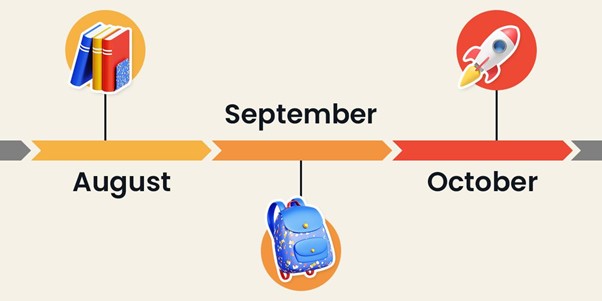
What is Back-to-School? Back-to-School is a significant period in marketing when students and parents purchase school supplies and clothing for the upcoming academic year. It also marks the start of the consumer shopping season and the transition into a new season. In Turkey, this period is typically considered to span August, September, and October. Who is the Target Audience for Back-to-School? Students, families, and teachers all engage in shopping to prepare for the new school year, covering needs ranging from electronics and stationery to clothing and footwear. With the rise of online education post-pandemic, demand for technological devices peaks during this time. What Are the Global Figures? The National Retail Federation forecasts that families with young children will spend a total of $38.8 billion on school shopping. For college students returning to school, this figure could rise to $86.6 billion. These numbers highlight the increased importance of technological products due to the digitalization accelerated by the pandemic. Online shopping remains a popular option for both families with young children and college students. Numerator has shared new data for the 2024 school shopping season. With the growing use of technology in classrooms, traditional school supply sales have decreased year-over-year, while online retailers have increased their share of the school supply market by 15 points over the last four years. Amazon leads in this sector. In the 2023/24 academic year, 90% of students used computers or tablets in their classrooms, and 80% used technology for school at home. Key findings include: Even young children use digital technology. While 2nd graders are least likely to use a computer or tablet for homework at home (60%), their use in the classroom is higher (83%). Computers are more commonly used than tablets. Last year, 69% of K-12 students did school work on computers, while 47% used tablets. 66% of households reused last year's supplies. Only 34% indicated they would purchase all new supplies. Online retailers captured 37% of school supply spending. Amazon has moved up to second place, surpassing Target. Effective Back-to-School Marketing IdeasInfluencers Appeal to Youth Young consumers place significant importance on the opinions of influencers they follow on social media when making shopping decisions. Partnering with influencers who appeal to this demographic can boost your brand's visibility and popularity among younger audiences. Collaborate with BTS influencers on platforms like TikTok and Instagram to effectively convey your brand message to young people. Parents and Teachers Matter too! The back-to-school period is crucial for parents and teachers as well. Parents are busy shopping to meet their children's needs, and teachers are preparing their classrooms for the new school year. Offering special promotions and discounts for parents and teachers can attract their interest and boost sales. Promotional Gifts In Turkey, promotional products are highly attractive to consumers. During the back-to-school period, consider offering school supplies, bags, or stationery sets as small gifts with purchases over a certain amount. These giveaways enhance the shopping experience and increase customer loyalty. Share User-Generated Content (UGC) on Social Media User-generated content plays a significant role in social media marketing. Share photos and videos that your customers post about your products to build brand credibility. Encourage customers to create UGC to increase engagement and expand your brand’s reach organically. Content and Theme Consistency Ensure that the content and themes used in your Back-to-School campaigns reflect the needs and expectations of your target audience. For instance, guides, shopping lists, and preparation tips related to returning to school can engage your customers. A well-aligned content strategy will make your brand message more impactful and effective. Choose the Right Products Selecting appropriate products based on your expertise and stocking up with relevant sizes and quantities can boost sales. Stationery, technology products, books, and clothing are always safe choices. Offering exclusive Back-to-School collections can set your brand apart from competitors. Back-to-School Promotions Implement various promotional strategies to attract customers. Percentage-based discounts, bundle deals for anticipated purchases, and student discounts can help drive sales. Email Marketing Email marketing is a key strategy for assisting parents and college students with their school shopping. Personalized content and discounts can effectively engage your customers. Customize Your Store for Back-to-School Make sure your website's landing page reflects the back-to-school theme. Display products under specific categories to simplify the purchasing process. Add Valuable Content to Your Blog Write blog posts offering guides and tips related to the back-to-school season to attract customers. Expert reviews and checklists can also be helpful. Partner with an Educational Institution Offering donation options to customers can build brand loyalty. Contributing to local schools can positively impact the community. Include a Gift with Every Purchase Adding a gift with purchases can enhance customer satisfaction. Offer unique gifts for customers who make purchases above a certain amount. Increase Reach with a Referral Program Encourage loyal customers to introduce your brand to their family and friends, boosting sales. Facilitate this process with referral links or unique codes. Invest in Customer Reviews Remember that shoppers look for brands they can trust. Product reviews play a significant role in purchasing decisions. Promote customer reviews to influence potential buyers and build trust in your brand.
Using GA4 Measurement Protocol on server-side Google Tag Manager
Google Analytics 4 (GA4) Measurement Protocol is a powerful tool for various data collection and analysis needs. Here are some use cases of the Measurement Protocol:1. Connecting Online and Offline BehaviorsGA4 Measurement Protocol allows you to combine online and offline customer interactions. For example, if a customer views a product on your online store and later purchases it in your physical store, you can merge these two interactions to create a more holistic customer journey.2. Measuring Client-Side and Server-Side InteractionsThe Measurement Protocol enables you to track both client-side and server-side interactions. This way, you can collect all user interactions occurring on your website and apps on a single platform.3. Sending Events Outside Standard User InteractionsYou can use the Measurement Protocol to send events outside standard user interactions, such as offline conversions, to GA4. This is especially useful for measuring the impact of your online ad campaigns on in-store sales.4. Sending Events from Devices and Apps Where Automatic Data Collection Is Not PossibleYou can send event data from kiosks, smartwatches, and other devices and applications where automatic data collection is not feasible. The Measurement Protocol enables you to integrate data from such devices and centralize all customer interactions.SetupIn server-side Google Tag Manager, we create the Measurement Protocol (GA4) ClientWe define the activation path as /mp/collect{ ‘measurement_id’: MEASUREMENT_ID, ‘api_secret’: API_SECRET, ‘client_id’: payload.get(‘client_id’), ‘events’: payload.get(‘events’) } Resources Google Analytics 4 Measurement Protocol Documentation By using the GA4 Measurement Protocol, you can enhance your business's data collection and analysis capabilities. This will help you make better business decisions and improve the customer experience.For more comprehensive technical measurement and product analytics, contact us